 Yiwaiwai
 Yiwaiwai for WhatsApp, Telegram, Line cross-border customer service
Which overseas chat platforms can Yiwaiwai attach to, can one account run WhatsApp, Telegram and Line, and how to use it for cross-border service? Scope and notes explained.


Can I use Yiwaiwai with WhatsApp for customer service in Thailand?
This should be viewed on two levels: first, the network - the software can be downloaded and installed, but cloud sync relies on mainland servers, so cross-border reachability in Thailand needs testing; second, the platform - what the Yiwaiwai official side confirms adapting to is mainland e-commerce platforms, and WhatsApp is not on the supported list, so whether it can dock and recognize needs to be confirmed through your own testing.
In other words, running the software locally in Thailand is fine, but using it together with WhatsApp is not an officially endorsed scenario, so it is recommended to try it out and verify before committing.
Can one Yiwaiwai account manage WhatsApp, Telegram, and Line at the same time?
What the Yiwaiwai official side confirms adapting to is mainland platforms such as Qianniu, Pinduoduo, WeChat, QQ, and JD Dongdong, claimed to adapt to over 80 platforms, but WhatsApp, Telegram, and Line are none of them on the confirmed list given in the materials.
It supports using one account for docking across multiple platform windows, but whether it can recognize and dock these three overseas apps at the same time needs to be confirmed through your own testing; the official side has no relevant explanation, so please do not treat it as a supported capability.
Can Yiwaiwai dock Zalo for e-commerce customer service in Vietnam?
The materials do not mention that Yiwaiwai supports Zalo; what the official side has confirmed adapting to is mainland e-commerce platforms such as Qianniu, Pinduoduo, WeChat, and QQ.
It docks by recognizing the desktop chat window, and whether it works on the Zalo desktop side is an uncovered case that needs to be confirmed through your own testing. In addition, when using it in Vietnam you should also note that cloud sync relies on mainland servers and cross-border network reachability needs to be tested yourself. It is recommended to install and try it first to verify whether Zalo is docked, and then decide whether to use it for formal customer service.
Does Yiwaiwai support the WhatsApp customer-service scenarios commonly used in Indonesia?
WhatsApp does not appear on the list of platforms the Yiwaiwai official side has confirmed adapting to (what the official side confirms is mainland platforms such as Qianniu, Pinduoduo, WeChat, and QQ), so the WhatsApp customer-service scenarios common in Indonesia are not an officially endorsed use.
Whether it can dock a WhatsApp window needs to be confirmed through your own testing. On top of that, cloud sync relies on mainland servers and Indonesia cross-border network reachability also needs to be tested yourself, so it is recommended to try it on a small scale first and commit to formal customer service only after verifying that both docking and the network work normally.
Is Yiwaiwai suitable for cross-border e-commerce customer service in the Philippines?
Yiwaiwai is a quick-reply tool aimed at the mainland e-commerce ecosystem, adapted to platforms such as Qianniu, Pinduoduo, Doudian, WeChat, and QQ.
If what you serve in the Philippines is mainland stores, its canned-response management and docked sending are very practical, and the price is low too. But if you use overseas platform back ends such as Shopee or Lazada, the compatibility needs to be tested yourself; and cloud sync relies on mainland servers, so the Philippines cross-border network reachability also needs testing. The materials have no official explanation specific to the Philippines, so it is recommended to try it out first and confirm that both platform docking and the network are fine.
Which chat apps does the Yiwaiwai docking feature support, and can it dock to WhatsApp?
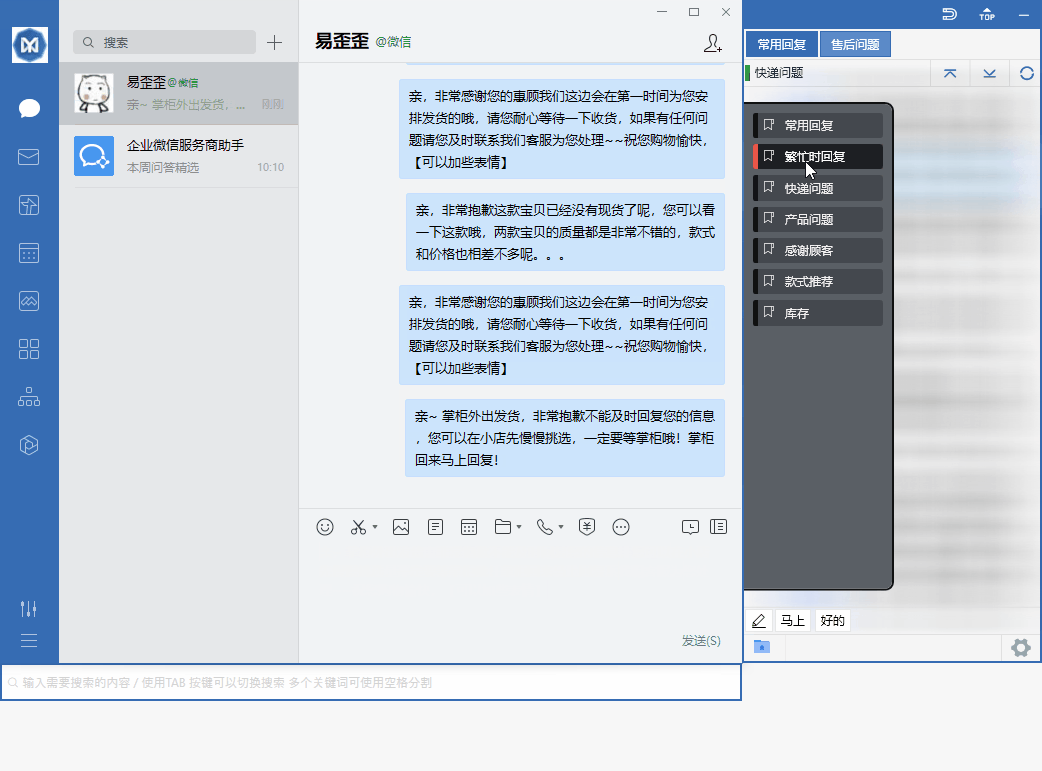
Yiwaiwai can automatically dock to chat windows such as QQ, WeChat, Qianniu, Wangwang, JD Dongdong, Pinduoduo, and DingTalk.
The official claim is compatibility with more than 30 kinds and adaptation to more than 80 platforms, mainly aimed at the mainland China e-commerce customer service ecosystem. As for WhatsApp, the official materials do not list it as a clearly supported docking target, so whether it can dock to WhatsApp cannot be confirmed, and you need to confirm it yourself through testing. If WhatsApp cannot be docked, you can still use Yiwaiwai as a script library, copy the script content, and paste it manually to send.
Compiled from public sources such as WhatsApp Business, Shopee Seller, AliExpress Seller and others; every link is clickable for verification.
Frequently Asked Questions
Can the free version of Yiwaiwai use quick replies and docking, and what does membership unlock?
Yes. The basic features of Yiwaiwai are permanently free - after download and installation you can use quick replies, window docking, and canned-response editing without requiring registration, and double-click to send, which meets everyday service needs. Membership (VIP) mainly unlocks the following: phrase storage raised from about 200 entries to 10,000 or more, multi-keyword search, global custom hotkeys, bulk operations, Excel/EBF import and export, cloud sync and multi-device roaming, team-shared canned responses, 7-day automatic cloud backup, and so on. In short: for personal use with low volume, the free version is enough; for a massive number of canned responses, bulk management, and multi-person team sync, upgrade to membership.
Do overseas users need to activate a membership to dock WhatsApp with Yiwaiwai?
First, to be clear: in the Yiwaiwai materials, WhatsApp is not among the docking platforms the official side has confirmed support for, so whether it can dock at all needs to be tested and has nothing to do with membership. Membership (Pro/VIP) unlocks advanced features such as canned-response cloud storage and sync, bulk operations, global hotkeys, and storage of more than 10,000 entries, while the basic window docking and quick replies are available in the free version. So the key to the question is not membership but whether WhatsApp is recognized for docking - which you would need to confirm through your own testing.
Could running Yiwaiwai on WhatsApp for quick replies get the account banned?
The materials have no official or community explanation of whether using Yiwaiwai on WhatsApp would lead to an account ban; this is unverified and would need cautious testing by you. Objectively, WhatsApp itself is not on the list of platforms the Yiwaiwai official side has confirmed support for, so whether it can dock at all has to be tested. A ban risk is usually related to the platform own automation policy and has no direct official conclusion tied to Yiwaiwai, so it is recommended to try it on a small scale and at a low frequency and to follow the WhatsApp official rules, without large-scale automated operations.
Can Yiwaiwai be used on an iPhone to dock WhatsApp?
No, for two reasons. First, the Yiwaiwai mobile side (iOS) is positioned as a supporting tool for canned-response storage and viewing, while paid use and docking-style quick replies happen mainly on the Windows desktop side; the iOS system itself also does not allow an app to float and dock over another app window. Second, WhatsApp is not on the list of platforms the official side has confirmed adapting to. So on an iPhone you cannot dock WhatsApp the way the computer does, and it is recommended to use it on Windows together with a supported platform.
On Windows 11, Yiwaiwai fails to dock to the chat window. How do I realign it?
Yiwaiwai officially supports Windows 7, 8, 10, and 11 (Windows XP is not supported), and the docking feature is compatible with Windows 11. If docking fails or the alignment is off, you can troubleshoot like this first: update the software to the latest version (new versions include performance and compatibility improvements); start it by right-clicking and choosing Run as administrator, because insufficient permissions often cause docking problems; and close and reopen the chat window you want to dock to so it can recognize and realign. If that still does not work, you can contact official customer service for help. The exact menu steps for realigning are not separately listed by the official documentation, so confirm them through testing.
After Yiwaiwai docks to the chat window it always blocks the dialog box. How do I adjust its position?
Yiwaiwai works by docking to the edge of the chat window. If it blocks the dialog box, you can usually drag the Yiwaiwai floating window or panel with the mouse to a position that does not obstruct your view (for example, moving it to the other side of the screen), and it will re-dock next to the chat window. On low-spec computers you can also turn off animation effects such as the new hover preview in the settings to reduce blocking and lag. The exact entry points for adjusting the position and the docking direction are in the client. The official documentation does not separately list detailed steps, so it needs to be confirmed through testing in the client.
Will bulk sending with Yiwaiwai on Telegram trigger restrictions?
Yiwaiwai is essentially a window-docking quick-reply tool whose role is to help you quickly send prepared canned responses to the chat box; it does not do automatic bulk sending itself. Whether restrictions are triggered depends on the sending-frequency and anti-spam rules of the Telegram platform itself and has little to do with Yiwaiwai: sending the same content to a large number of strangers in a short time easily triggers Telegram risk control. It is recommended to control the sending pace, make the content varied, and avoid mechanical spamming. The exact restriction thresholds of Telegram are platform rules and need to be confirmed through testing.
Does Yiwaiwai quick reply for Line support pictures and files?
The core of Yiwaiwai is quickly sending prestored text scripts to the chat window, and it supports text and content with emoji fairly well. Whether it can send pictures and files with one click depends on how deeply it adapts to the Line window and on how Line itself sends content. The official public materials do not clearly state its picture and file support for Line. The safe approach is to test it first with the free edition: save a script with a picture and try sending it to Line to see whether it comes out normally. Line is also not separately listed in the official platform list of Yiwaiwai, so it is recommended to rely on the test results.
Can Yiwaiwai automatically dock and send canned responses on the web version of Messenger?
Yiwaiwai officially claims compatibility with more than 30 chat apps and adaptation to more than 80 platforms, and it provides a browser extension, so in principle it has docking ability for web-based chat tools, and you send a canned response with a double-click. However, the official public list mainly lists the mainland China e-commerce ecosystem such as Qianniu, Pinduoduo, WeChat, and QQ, and does not separately confirm the docking effect on the web version of Messenger. It is recommended to install the browser extension or desktop edition first, open the web version of Messenger, and test whether docking works. Messenger adaptation is not clearly covered by the official side and needs to be confirmed through testing.
Does Yiwaiwai support running multiple accounts of WhatsApp, Telegram, and Line at the same time?
Yiwaiwai is a quick-reply tool that docks beside the chat window. Which windows it can dock to and whether it can run multiple instances mainly depend on how many chat app windows your computer can open at the same time and on how well Yiwaiwai recognizes those windows. The official claim is that it supports multiple chat windows at once and can dock to multiple platforms, but the public materials do not clearly state the adaptation for running multiple accounts of WhatsApp, Telegram, and Line at the same time. It is recommended to open multiple clients first and test whether docking can recognize them all. The multi-instance adaptation for these three is not covered by the official side and needs to be confirmed through testing.
Compared with Liaotianbao and Kefubao, which is more suitable for overseas WhatsApp customer service: Yiwaiwai?
These are all window-docking quick-reply tools with similar mechanisms: quickly sending prestored scripts to the chat box, with support for public and private script levels and team sharing. What Yiwaiwai officially adapts to is mainly the mainland China e-commerce ecosystem such as Qianniu, Pinduoduo, WeChat, and QQ, with no dedicated documentation for overseas WhatsApp. Which one is more suitable for overseas WhatsApp depends mainly on the docking stability for the WhatsApp Web or desktop window, and none of these have a clear commitment from their official side for overseas WhatsApp. It is recommended to download the free edition of each, test the docking and sending in your own WhatsApp environment, and then decide, confirming through testing.
Compared with software such as Som and Quicker, is Yiwaiwai more convenient for cross-border customer service?
They are positioned differently. Yiwaiwai is a dedicated quick-reply assistant for customer service, and it is fairly smooth around the script library, public and private levels, team sharing, and window docking, which suits pure reply scenarios; tools like Quicker are general-purpose efficiency and quick-action tools with broader features, but customer service scripts are not their specialty. For cross-border customer service, if the main need is to quickly send default scripts and share a script library across a team, a dedicated tool like Yiwaiwai is a better match. But what Yiwaiwai officially adapts to leans toward mainland China e-commerce platforms, and adaptation to overseas platforms needs to be tested yourself. The exact convenience for cross-border use varies by platform and needs to be confirmed through testing.
Does the overseas version of Yiwaiwai need to be downloaded separately, and is it the same as the domestic version?
The materials do not mention that Yiwaiwai has a dedicated overseas version; the official side confirms only this one download location, the official site yiwaiwaiservice.com, covering Windows, macOS, Android, iOS, and the browser extension. So what overseas users download is the very same version, and there is no separate overseas version. Be sure to look for the official site yiwaiwaiservice.com and be wary of lookalike domains with altered prefixes or suffixes (such as yi-waiwai.com and the like, which jump to an unrelated .shop domain that delivers an exe directly, a form of malicious distribution).
Will Yiwaiwai be throttled when used overseas, and how many messages can the free version send per day?
The Yiwaiwai installer is very small (about 40 to 80 MB), and there is no evidence in the materials that the server actively throttles downloads; the so-called slowness is mostly cross-border network jitter. Sending a canned response is a local double-click action, and there is no statement in the materials about a how-many-messages-per-day limit. The real limit of the free version is canned-response storage of about 200 entries, and after upgrading to membership you can store more than 10,000. In other words, the limit is on how many you can store, not on how many you can send per day.
How do you get Yiwaiwai to dock beside the chat window without drifting around?
Docking is the core mechanism of Yiwaiwai - after you open the software, it automatically recognizes and docks beside the chat window you currently have active (WeChat, QQ, Qianniu, Pinduoduo, and so on) and follows the window as it moves, making it easy for you to double-click a canned response to send it directly. If the position drifts around or it does not dock, this is usually related to window recognition, display resolution, or a multi-monitor setup, and you can try: reactivating the chat window once, placing both Yiwaiwai and the chat software on the same screen, and updating to the latest version. The official side has no dedicated FAQ for docking anomalies, so the exact adjustment would need to be confirmed through testing.
Can Yiwaiwai be used on Telegram?
The compatible platforms explicitly listed by the official side are concentrated in the mainland ecosystem (WeChat, QQ, Qianniu, Pinduoduo, DingTalk, JD Dongdong, and so on), and Telegram is not named as supported. Yiwaiwai works by window docking and may have some general adaptability to desktop chat windows, but whether it can stably dock to Telegram and send canned responses normally is not explained by the official side and is unverified, so you would need to test it yourself. It is recommended to install the free version first, test on the Telegram desktop side whether docking and sending work normally, and then decide whether to use it long term.
Does Yiwaiwai support quick replies on Line?
The platforms the official side has announced support for are mainly mainland e-commerce/social (WeChat, QQ, Qianniu, Wangwang, Pinduoduo, DingTalk, and so on), and the public materials do not clearly state support for Line. As a window-docking quick-reply tool, whether it can stably dock to the Line desktop window and double-click to send canned responses is not explained by the official side and is unverified, so you would need to confirm it through your own testing. Sellers in Southeast Asia who commonly use Line are advised to do a small-scale test on the Line desktop side with the free version first, and use it only after confirming that docking and sending both work normally.
Is Yiwaiwai good for cross-border customer service?
Yiwaiwai is a mainland China e-commerce customer-service quick-reply tool, mainly adapted to the chat windows of mainland e-commerce ecosystems such as Qianniu, Pinduoduo, Doudian, WeChat, QQ, JD Dongdong, and web pages; after docking, a double-click sends a canned response, which is very smooth for mainland platform customer service. But when used on overseas platform back ends such as Shopee or Lazada, whether it can dock and recognize normally needs to be confirmed through your own testing, as the official side has no dedicated version or explanation for cross-border use. If you mainly serve mainland stores, it is very useful; for purely overseas platforms, it is recommended to download and try it first before deciding.
Can Yiwaiwai dock to Messenger for quick replies?
The compatibility range the official side has announced is mainland mainstream e-commerce and social platforms such as Qianniu, Wangwang, Pinduoduo, JD Dongdong, DingTalk, WeChat, and QQ (claimed to be compatible with more than 30 types and to adapt to over 80 platforms), and the materials do not clearly mention Facebook Messenger. Its docking principle is to recognize a chat window and then dock beside it, so in theory it may work for desktop chat windows, but whether it can stably dock to Messenger needs to be confirmed through your own testing, as the official side has not included it in the confirmed-support list.
Can Yiwaiwai actually run on WhatsApp Web?
What the official side confirms support for is mainland e-commerce-related windows such as Qianniu, Pinduoduo, Doudian, WeChat, QQ, and web pages, and the materials do not include WhatsApp (including the web version) among the confirmed-support platforms. Its docking mechanism is to recognize a chat window and then dock; whether running on WhatsApp Web can be recognized correctly and whether double-click sending works needs to be confirmed through your own testing. The official side has no relevant explanation, so please do not treat it as a supported feature.
Does Yiwaiwai support the WhatsApp Business version?
There is no official statement in the materials mentioning that Yiwaiwai supports WhatsApp Business. What it has confirmed adapting to is mainland platforms such as Qianniu, Pinduoduo, Doudian, WeChat, and QQ, and the docking principle is to recognize the desktop chat window. Whether the WhatsApp Business desktop side can be recognized for docking is an uncovered case and needs to be confirmed through your own testing after installation; do not treat it as an officially promised feature.
Can Yiwaiwai recognize a Telegram chat window and dock automatically?
The platforms the official side has announced compatibility with are mainland mainstream platforms such as Qianniu, Wangwang, Pinduoduo, JD Dongdong, DingTalk, WeChat, and QQ, and the materials do not mention Telegram. It does indeed dock by automatically recognizing a chat window, so in theory it may work for desktop windows, but whether it can stably recognize Telegram and double-click to send needs to be confirmed through your own testing, as the official side has not included it in the supported list.