 Yiwaiwai
 Customer Service Reply Efficiency Calculator
Enter your volume and typing habits to estimate how much typing time quick replies can save per day, and see the efficiency value of a canned-response tool at a glance.

Is Yiwaiwai failing to open in Vietnam because it is blocked, and how do I fix it?
It is not necessarily blocked. The Yiwaiwai installer is very small and is hosted on an Alibaba Cloud Hong Kong OSS node; the more common reasons for failing to open are download network jitter, install permissions, or the software lagging while running.
You can troubleshoot in this order: 1) If the install fails, right-click the installer and Run as administrator, and do not install it to the C drive. 2) If the network is unstable, re-download with a multi-threading plus resume download manager. 3) If it lags after installing, update to the latest version, close background programs, reduce add-ons, and clear the cache.
Overseas reachability is not clearly stated by the official side and is unverified. The most stable solution is to use the standalone/offline version directly, which is purely local and offline, avoiding network issues at the root.
How do you use Yiwaiwai on an Android phone, and can the mobile side set up quick replies?
Yiwaiwai supports Android, and canned responses can roam across devices with your account - canned responses you edited on the computer can be synced, viewed, and used on the phone after you log in to the same account.
However, the mobile side leans more toward a supporting role of canned-response storage and viewing, while the truly high-frequency quick-reply work happens mainly on the Windows desktop side (together with Qianniu, Pinduoduo, WeChat, QQ, and so on). Whether the mobile side can dock to windows and set up full quick replies the way the computer does is not detailed in the official public materials and would need to be confirmed through testing. Multi-device sync requires logging in to the online-version account.
Can Yiwaiwai be installed on an Apple iPhone, and what do I do if it cannot be found in the App Store?
Yiwaiwai has an iOS version (the App Store name is Yiwaiwai, about 14 MB in size) and can be installed on an Apple phone.
If you cannot find it, it may be related to your App Store country/region - the app is mainly listed in the China region, and overseas-region accounts may not be able to find it, so you can try switching to a China-region Apple ID and searching again (to be confirmed through testing). Note that the iOS side is positioned as a supporting tool for canned-response storage and viewing, while the main paid and heavy use are on the Windows desktop side. If you only use it on a single machine, you can also use the standalone version on the computer.
How do you install and do the first-time setup of the Yiwaiwai Windows computer version?
Installation steps (per the official wording): 1) Go to the Windows download page on the official site yiwaiwaiservice.com to download; Win7/8/10/11 are supported and XP is not.
2) Run the installer, preferably right-click and Run as administrator to avoid permission issues, and click Next. 3) Use Browse to change the install directory to the D drive (such as D:\CustomerServiceTools\Yiwaiwai), and do not install it to the C drive, which makes backups easier. 4) Check Create desktop shortcut and click Next until it finishes.
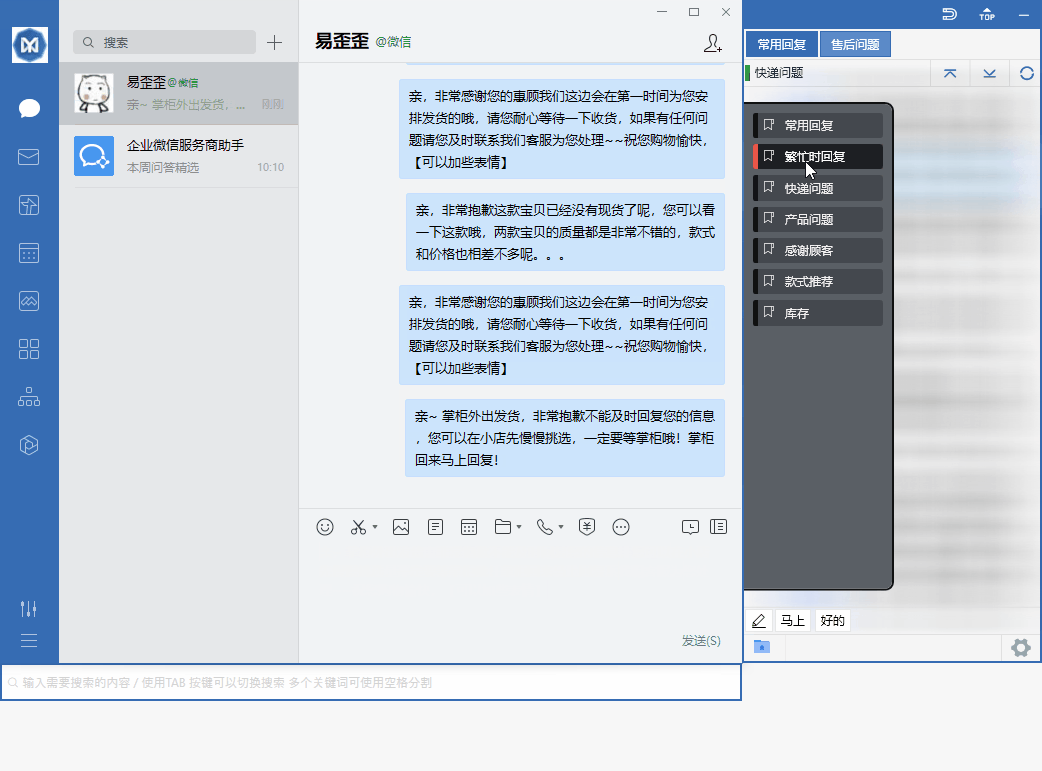
First-time setup: after opening the software, it automatically docks beside the chat window; first go edit and save a few common canned responses, and during service a double-click sends them. The basic features can be used without requiring registration.
Can Yiwaiwai be used on a Mac, and is the setup process the same?
Yiwaiwai can be used; the official side provides a macOS version (the package is served directly from the Mac download page on the official site yiwaiwaiservice.com).
After installation, if you are told it cannot be opened or is blocked by the system, follow the official solution: System Preferences, then Security and Privacy, then General, then choose Open Anyway. The official pages do not distinguish between Intel and Apple Silicon chips and do not state a minimum macOS version.
After installation, the usage idea is the same as on Windows: edit your canned responses first, the software docks beside the chat window, and double-click to send. The basic features are permanently free and do not require registration.
What do I do if a Taiwan phone number cannot receive the verification code when registering for Yiwaiwai?
Yiwaiwai registration mainly uses a mainland 11-digit phone number plus a 6-digit SMS code, and a Taiwan or other overseas phone number often cannot receive the code (the official side does not clearly support overseas numbers; to be confirmed through testing).
Two alternatives: first, some registration pages support registering with email plus password, where the email receives an activation code, and overseas users can try email first; second, if you only use it on a single machine and do not need cloud sync or multi-person sharing, install the standalone/offline version directly, which requires no account registration at all and is ready to use after download and installation, avoiding the problem of not receiving the code at the root.
Compiled from public sources such as Taobao Qianniu, Douyin E-commerce, CNNIC and others; every link is clickable for verification.
Frequently Asked Questions
Is it safe to register Yiwaiwai abroad with an SMS verification service, and could the account be banned?
In the official materials, the Yiwaiwai registration method is a phone number (11 digits plus an SMS verification code) or email plus password, and there is no statement about its stance on numbers from SMS verification services. Numbers registered through one-time SMS verification services commonly carry risks such as not receiving second verification codes, being unable to recover the account after the number is recycled, and being flagged as abnormal by risk control. This is a general situation and not limited to Yiwaiwai. If your overseas phone number cannot receive a verification code, the safer choice is to try email plus password registration. Whether the account would be banned because of an SMS verification service is not officially stated, so you need to confirm it yourself through testing, and it is recommended to give priority to a real, controllable number or email.
Can I sign in to Yiwaiwai directly with an Apple ID and then start setting up quick replies?
Based on the available official materials, the Yiwaiwai sign-in method is the registered account and password (registered by phone number or email), and there is no mention of support for signing in directly with an Apple ID. Downloading the app from the App Store is free, but what you sign in with is still the account system of Yiwaiwai itself, not an Apple ID. After signing in you can start setting up quick replies and canned responses. One more reminder: Pro paid features and the main script setup are concentrated on the Windows desktop, while the mobile apps are more of a companion tool for storage and viewing. Whether Apple ID sign-in is supported needs to be confirmed by your own testing.
A Hong Kong phone number cannot receive the SMS for Yiwaiwai registration. Can I register with email instead?
Yes, you can try email registration. Yiwaiwai registration is primarily by phone number (enter a phone number and receive a 6-digit SMS verification code), but some pages also clearly mention that you can register with email plus password (the email receives a verification code for activation). If a Hong Kong phone number cannot receive the SMS verification code, switching to email registration is the alternative the official documentation mentions. If you cannot even find the email entry point or have trouble with activation, it is recommended to contact official customer service. The compatibility of registering with overseas numbers is not specifically documented, so you need to confirm it yourself through testing.
Yiwaiwai shows that the number is not supported when registering with a Singapore phone number. What should I do?
Yiwaiwai registration is primarily by phone number, but what the page mentions is entering an 11-digit phone number, and this flow is mainly aimed at mainland China numbers, so it is possible that overseas numbers such as Singapore ones show as not supported. In this case it is recommended to switch to the alternative the official documentation provides: email plus password registration (the email receives a verification code for activation), which bypasses the phone number restriction. If you just want to use the basic features locally, you can also use the standalone edition directly; you can use basic features such as quick replies without registering. The support situation for overseas numbers is not clearly documented, so you need to confirm it yourself through testing or by asking customer service.
How do I manage quick replies in Yiwaiwai by groups so they are easy to find when there are many customers?
Yiwaiwai canned responses are managed by levels. The basic structure is public scripts plus private scripts, and some editions further break it down into three levels: company, group, and private. You can sort different types of scripts such as shipping, after-sales, and payment reminders into different groups. Public and company scripts are shared by the team, while private scripts are visible only to yourself, so even with many customers you can quickly find the matching reply by category. The exact steps for creating and naming groups are done in the script management screen of the client. The official documentation does not separately list detailed steps, so you can confirm them by actually operating in the client.
How do I trigger Yiwaiwai quick replies with keywords so they pop up when I type letters?
Yiwaiwai supports quickly invoking canned responses, and VIP membership also provides multi-keyword search and global custom hotkeys, so you can use a keyword search to quickly locate the matching script and then double-click to send it. To achieve keyword triggering, where typing a few characters or letters pops up the matching reply, you usually need to set keywords or abbreviations for the scripts and use them together with multi-keyword search (these are Pro and VIP exclusive; the free edition does not have them). The exact entry point for trigger settings is in the script editing area of the client. The official documentation does not separately list detailed steps, so it needs to be confirmed through testing in the client.
How do I insert variables such as a customer nickname or order number into a Yiwaiwai canned response?
The available official materials do not clearly state that Yiwaiwai supports inserting automatic variables such as a customer nickname or order number into canned responses. This kind of dynamic variable or field substitution feature is supported by some quick-reply tools and not by others. Whether Yiwaiwai supports it and how to set it up is not covered by the materials, so you need to confirm it through testing in the client or by asking official customer service. A safe alternative is to make the script into a template with blanks left open, and fill in the nickname and order number by hand after sending.
Can Yiwaiwai combine an image-and-text canned response into a single message with the picture and text sent together?
Yiwaiwai is a window-docking quick-reply tool that supports invoking script content and sending it to the chat window. Whether it supports packaging an image and text into a single combined image-and-text canned response sent together is not clearly stated in the available official materials, so you need to confirm it through testing in the client. If combining into a single message is not supported, the common alternative is to create the image and the text as two adjacent scripts, and when needed double-click them in a row to send the image first and then the text, which can also quickly complete an image-and-text reply.
Does Yiwaiwai support importing canned responses from an Excel spreadsheet, and what format should the spreadsheet follow?
Yes, it is supported. Yiwaiwai VIP membership provides Excel and EBF import and export, so you can import canned responses in batches with an Excel spreadsheet. However, the official materials do not give the exact column format of the Excel template (such as which column holds the title, which holds the content, and which holds the keywords), so it is recommended to download the official import template inside the import feature of the client and fill it in according to the column order of the template, which is the safest. The exact spreadsheet format should follow the actual template in the client, and needs to be confirmed through testing.
How do I import a canned-response package shared by someone else into my own Yiwaiwai account?
Yiwaiwai supports importing and exporting canned responses, and VIP membership can import and export in Excel and EBF formats. If what someone shares with you is an exported script file (such as EBF or Excel), you can select that file to import in the import feature of your own client, and after importing it goes into your script library. With the connected edition it also syncs to the cloud and becomes available across devices. Note that the import file format must be correct; the wrong format will cause an error. The exact import entry point and the format of the shared package should follow the actual client, and need to be confirmed through testing.
Traditional Chinese characters in Yiwaiwai canned responses turn into garbled text after import. How do I fix it?
Garbled text after import is usually caused by a mismatch between the text encoding of the import file and the encoding the software reads (commonly when Excel or text is saved with the wrong encoding). Workable options: save the Excel or text file you want to import as UTF-8 encoding and import it again, or confirm the content displays correctly in Excel before using the import feature of the software. Yiwaiwai has no dedicated documentation about garbled traditional Chinese characters; this is a general encoding problem, and handling it with the methods above usually resolves it, though you still need to confirm it yourself through testing.
Can Yiwaiwai import multilingual canned responses in Thai and Vietnamese to send to local customers?
Yiwaiwai supports importing canned responses via Excel and EBF, so in principle you can make Thai and Vietnamese scripts into a spreadsheet, import and save them for use, and double-click to send them just like Chinese scripts. However, the official materials have no dedicated documentation for multiple languages or less common languages, so when importing such text take care to use UTF-8 encoding for the file to avoid garbled text. Whether Thai and Vietnamese can display and send perfectly, and whether the overseas platform you send to supports them, is something you should confirm by importing a small amount for testing before using it in bulk.
After Yiwaiwai docks to the chat window it always blocks the dialog box. How do I adjust its position?
Yiwaiwai works by docking to the edge of the chat window. If it blocks the dialog box, you can usually drag the Yiwaiwai floating window or panel with the mouse to a position that does not obstruct your view (for example, moving it to the other side of the screen), and it will re-dock next to the chat window. On low-spec computers you can also turn off animation effects such as the new hover preview in the settings to reduce blocking and lag. The exact entry points for adjusting the position and the docking direction are in the client. The official documentation does not separately list detailed steps, so it needs to be confirmed through testing in the client.
Which chat apps does the Yiwaiwai docking feature support, and can it dock to WhatsApp?
Yiwaiwai can automatically dock to chat windows such as QQ, WeChat, Qianniu, Wangwang, JD Dongdong, Pinduoduo, and DingTalk. The official claim is compatibility with more than 30 kinds and adaptation to more than 80 platforms, mainly aimed at the mainland China e-commerce customer service ecosystem. As for WhatsApp, the official materials do not list it as a clearly supported docking target, so whether it can dock to WhatsApp cannot be confirmed, and you need to confirm it yourself through testing. If WhatsApp cannot be docked, you can still use Yiwaiwai as a script library, copy the script content, and paste it manually to send.
When Yiwaiwai sends a picture it gets compressed and blurry. How do I send the original picture?
A picture turning blurry after sending is usually because the receiving chat platform (such as WeChat or QQ) compresses the picture by default when sending; this is platform behavior, not Yiwaiwai blurring the picture itself. To send the original picture, you generally need to choose the Send as file or Send original option in the chat app you use, rather than sending it as an ordinary picture. Yiwaiwai has no dedicated documentation about an original picture setting; this is a general issue of platform compression, and the exact behavior depends on the original picture option of the chat app you use, so confirm it yourself through testing.
Does Yiwaiwai have a length or size limit for sending videos, and what do I do if it is exceeded?
The official Yiwaiwai materials do not give a specific limit on video length or size. In practice, whether a video can be sent and what counts as too large mainly depend on the receiving chat platform (WeChat, QQ, and so on) and its limit on a single file, not on Yiwaiwai itself. If it shows that the limit is exceeded, a workable option is to compress the video to a size the platform allows, or switch to sending a cloud drive link instead. The exact limit depends on the chat platform you use, so it is recommended to confirm it yourself through testing.
How do I package a picture, video, and text into one set of canned responses and send them all at once in Yiwaiwai?
Yiwaiwai supports invoking canned responses and sending them to the chat window, but whether it supports merging a picture, video, and text into one packaged script sent all at once is not clearly stated in the official materials, so you need to confirm it through testing in the client. If packaging into a single message is not supported, the common alternative is to create the picture, video, and text as a few adjacent scripts, and when needed double-click them in a row to send them one after another, which in practice can also quickly send a whole set of image, video, and text replies.
Can Yiwaiwai be set up to send the same set of canned responses to multiple customers with one click?
The core of Yiwaiwai is window-docking quick replies, where you double-click a canned response to send it to the current chat window. The official materials do not mention a bulk-send feature such as sending the same set of scripts to multiple customers with one click, so whether bulk sending is supported cannot be confirmed, and you need to confirm it yourself through testing or by asking official customer service. One reminder: many e-commerce and chat platforms have risk-control restrictions on bulk sending, and even if it is possible you should be careful to avoid the account being flagged as abnormal. Whether a bulk-send feature exists needs to be confirmed through testing.
After setting up auto-reply in Yiwaiwai, can it reply to customers automatically at night when nobody is around?
The available official materials do not clearly state that Yiwaiwai supports an unattended auto-reply (robot auto-response) feature. Its positioning is a quick-reply assistant for customer service, and the core is a human agent double-clicking a canned response to send it quickly, not an automatic-response robot. So the ability to reply to customers automatically at night when nobody is around cannot be confirmed, and you need to confirm it yourself through testing or by asking official customer service. If you really need automatic replies at night, this usually has to be achieved through the auto-reply or robot feature built into the back end of the e-commerce platform you use.
Compared with Kefubao and Kuaijie Zhushou, which is more convenient and more suitable for overseas customer service: Yiwaiwai?
These are all similar quick-reply and canned-response tools for customer service, with comparable mechanisms (scripts split into public and private, and team sharing and sync). From the available materials, Yiwaiwai has permanently free basic features, a standalone offline edition, and Pro starting at just 48 yuan per year, so the price threshold is low, and it fits the mainland China e-commerce ecosystem such as Qianniu, Pinduoduo, WeChat, and QQ. But as for which is better for overseas customer service, neither the official side nor Chinese-language communities (Zhihu, Xiaohongshu, Dcard, PTT) have much targeted review, so reliable comparison sources are lacking. It is recommended to decide based on the platforms you commonly use and whether you need offline or team sync, after actually trying them out, and to confirm through testing.