 Yiwaiwai
 Yiwaiwai for Overseas and Cross-Border E-Commerce Customer Service
Can cross-border platforms and overseas teams use Yiwaiwai? This article clarifies its usable scope as an input helper, how it fits web-based chat, and what to keep in mind when using it overseas.

Can Yiwaiwai be used on Telegram?
The compatible platforms explicitly listed by the official side are concentrated in the mainland ecosystem (WeChat, QQ, Qianniu, Pinduoduo, DingTalk, JD Dongdong, and so on), and Telegram is not named as supported.
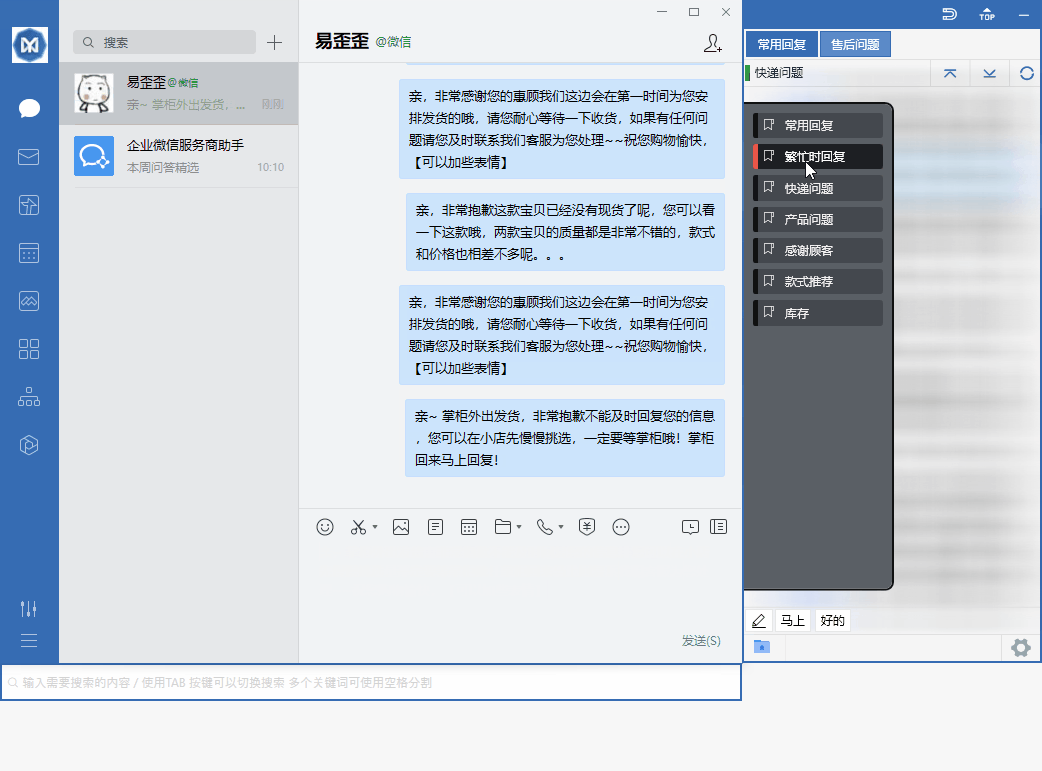
Yiwaiwai works by window docking and may have some general adaptability to desktop chat windows, but whether it can stably dock to Telegram and send canned responses normally is not explained by the official side and is unverified, so you would need to test it yourself. It is recommended to install the free version first, test on the Telegram desktop side whether docking and sending work normally, and then decide whether to use it long term.
Does Yiwaiwai support quick replies on Line?
The platforms the official side has announced support for are mainly mainland e-commerce/social (WeChat, QQ, Qianniu, Wangwang, Pinduoduo, DingTalk, and so on), and the public materials do not clearly state support for Line.
As a window-docking quick-reply tool, whether it can stably dock to the Line desktop window and double-click to send canned responses is not explained by the official side and is unverified, so you would need to confirm it through your own testing. Sellers in Southeast Asia who commonly use Line are advised to do a small-scale test on the Line desktop side with the free version first, and use it only after confirming that docking and sending both work normally.
Can Yiwaiwai be used normally overseas?
Whether Yiwaiwai can be used overseas should be viewed on two levels.
Basic use: after download and installation you can edit canned responses and use quick replies without requiring registration, and the standalone version is entirely local, offline, and requires no registration, so it can be used normally overseas too - this part is the most reliable. The online part: account login and cloud sync rely on mainland services, and overseas network reachability is not clearly explained by the official side or by Chinese-language communities; it is unverified and would need to be confirmed through testing.
In addition, the platforms it adapts to are mostly mainland e-commerce ones (WeChat, Qianniu, Pinduoduo, and so on), so sellers who do cross-border work on overseas platform back ends should test the compatibility themselves. Overseas users are advised to use the standalone version first and test the online version only if multi-device sync is truly needed.
Is Yiwaiwai good for cross-border customer service?
Yiwaiwai is a mainland China e-commerce customer-service quick-reply tool, mainly adapted to the chat windows of mainland e-commerce ecosystems such as Qianniu, Pinduoduo, Doudian, WeChat, QQ, JD Dongdong, and web pages; after docking, a double-click sends a canned response, which is very smooth for mainland platform customer service.
But when used on overseas platform back ends such as Shopee or Lazada, whether it can dock and recognize normally needs to be confirmed through your own testing, as the official side has no dedicated version or explanation for cross-border use. If you mainly serve mainland stores, it is very useful; for purely overseas platforms, it is recommended to download and try it first before deciding.
Can Yiwaiwai be used in Hong Kong?
The Yiwaiwai software itself can be downloaded, installed, and run, and the quick-reply feature docking to mainland e-commerce platforms works normally locally.
Two points to note: first, its cloud sync and account login rely on mainland servers, and whether the Hong Kong cross-border network is stable and whether cloud sync can be connected smoothly from overseas is not clearly explained by the official side, so you would need to test it; second, if you only use the standalone version (offline version), it runs entirely locally with no need for an internet connection or registration, so an unstable Hong Kong network does not affect it. It is recommended to start with the standalone version as a base in Hong Kong, and test network reachability when you need cloud sync.
Can Yiwaiwai dock to Messenger for quick replies?
The compatibility range the official side has announced is mainland mainstream e-commerce and social platforms such as Qianniu, Wangwang, Pinduoduo, JD Dongdong, DingTalk, WeChat, and QQ (claimed to be compatible with more than 30 types and to adapt to over 80 platforms), and the materials do not clearly mention Facebook Messenger.
Its docking principle is to recognize a chat window and then dock beside it, so in theory it may work for desktop chat windows, but whether it can stably dock to Messenger needs to be confirmed through your own testing, as the official side has not included it in the confirmed-support list.
Does Yiwaiwai count as a good one among Southeast Asia customer-service software?
Yiwaiwai is positioned as a quick-reply assistant for mainland China e-commerce customer service, and it is mature in basic capabilities such as canned-response management, window docking, double-click sending, and multi-person shared sync, with a low price too (personal membership from 48 yuan per year, basic features permanently free).
But it is itself aimed at the mainland e-commerce ecosystem, and there is almost no targeted review discussion of it in Southeast Asian communities, so whether it is good depends more on whether it can dock to the platform you use. There is no public head-to-head comparison with local Southeast Asian customer-service software, so it is recommended to judge after trying it on your actual platform.
Can Yiwaiwai actually run on WhatsApp Web?
What the official side confirms support for is mainland e-commerce-related windows such as Qianniu, Pinduoduo, Doudian, WeChat, QQ, and web pages, and the materials do not include WhatsApp (including the web version) among the confirmed-support platforms.
Its docking mechanism is to recognize a chat window and then dock; whether running on WhatsApp Web can be recognized correctly and whether double-click sending works needs to be confirmed through your own testing. The official side has no relevant explanation, so please do not treat it as a supported feature.
Does Yiwaiwai support the WhatsApp Business version?
There is no official statement in the materials mentioning that Yiwaiwai supports WhatsApp Business.
What it has confirmed adapting to is mainland platforms such as Qianniu, Pinduoduo, Doudian, WeChat, and QQ, and the docking principle is to recognize the desktop chat window. Whether the WhatsApp Business desktop side can be recognized for docking is an uncovered case and needs to be confirmed through your own testing after installation; do not treat it as an officially promised feature.
Can Yiwaiwai recognize a Telegram chat window and dock automatically?
The platforms the official side has announced compatibility with are mainland mainstream platforms such as Qianniu, Wangwang, Pinduoduo, JD Dongdong, DingTalk, WeChat, and QQ, and the materials do not mention Telegram.
It does indeed dock by automatically recognizing a chat window, so in theory it may work for desktop windows, but whether it can stably recognize Telegram and double-click to send needs to be confirmed through your own testing, as the official side has not included it in the supported list.
Can Yiwaiwai be downloaded and installed in Singapore?
You can try to download Yiwaiwai. The official installer is hosted on an Alibaba Cloud Hong Kong OSS node, which is geographically close to Southeast Asia, so downloads in Singapore are usually fairly fast, but cross-border public network speeds vary with the carrier and the time of day.
It is recommended to look for the official site yiwaiwaiservice.com and download directly from it. If the official site cannot be opened locally or downloads slowly, you can switch to the fully offline standalone version, which only needs to be downloaded once for long-term local use. Be sure to avoid lookalike domains.
Can an account be registered for Yiwaiwai in Malaysia?
Yiwaiwai registration mainly uses a phone number (enter an 11-digit phone number to receive a 6-digit SMS code), and some pages also support registering with email plus password.
The materials do not explain whether an overseas phone number can receive the code, so whether registration with a local number in Malaysia can succeed needs to be tested; if the phone number cannot receive the code, you can switch to email registration. In addition, whether the mainland cloud service can be connected normally also needs to be tested yourself. If you only use the basic features, you can actually use the standalone version without registering.
Can Yiwaiwai be used in Taiwan? Do I need a VPN to get over the wall?
The Yiwaiwai software itself can be downloaded and installed, and the docking and local canned-response features work normally.
The materials have no official explanation of whether using it in Taiwan needs special network settings; cloud sync and account login rely on mainland servers, overseas network reachability is unverified, and whether extra network measures are needed would need your own testing. The most reliable approach is to use the fully offline standalone version, which can be used locally without an internet connection or registration and is not affected by the cross-border network; test the network separately when you need cloud sync.
Compiled from public sources such as Shopee Seller, AliExpress Seller, WhatsApp Business and others; every link is clickable for verification.
Frequently Asked Questions
Can I use Yiwaiwai with WhatsApp for customer service in Thailand?
This should be viewed on two levels: first, the network - the software can be downloaded and installed, but cloud sync relies on mainland servers, so cross-border reachability in Thailand needs testing; second, the platform - what the Yiwaiwai official side confirms adapting to is mainland e-commerce platforms, and WhatsApp is not on the supported list, so whether it can dock and recognize needs to be confirmed through your own testing. In other words, running the software locally in Thailand is fine, but using it together with WhatsApp is not an officially endorsed scenario, so it is recommended to try it out and verify before committing.
Does the overseas version of Yiwaiwai need to be downloaded separately, and is it the same as the domestic version?
The materials do not mention that Yiwaiwai has a dedicated overseas version; the official side confirms only this one download location, the official site yiwaiwaiservice.com, covering Windows, macOS, Android, iOS, and the browser extension. So what overseas users download is the very same version, and there is no separate overseas version. Be sure to look for the official site yiwaiwaiservice.com and be wary of lookalike domains with altered prefixes or suffixes (such as yi-waiwai.com and the like, which jump to an unrelated .shop domain that delivers an exe directly, a form of malicious distribution).
Do overseas users need to activate a membership to dock WhatsApp with Yiwaiwai?
First, to be clear: in the Yiwaiwai materials, WhatsApp is not among the docking platforms the official side has confirmed support for, so whether it can dock at all needs to be tested and has nothing to do with membership. Membership (Pro/VIP) unlocks advanced features such as canned-response cloud storage and sync, bulk operations, global hotkeys, and storage of more than 10,000 entries, while the basic window docking and quick replies are available in the free version. So the key to the question is not membership but whether WhatsApp is recognized for docking - which you would need to confirm through your own testing.
Will Yiwaiwai be throttled when used overseas, and how many messages can the free version send per day?
The Yiwaiwai installer is very small (about 40 to 80 MB), and there is no evidence in the materials that the server actively throttles downloads; the so-called slowness is mostly cross-border network jitter. Sending a canned response is a local double-click action, and there is no statement in the materials about a how-many-messages-per-day limit. The real limit of the free version is canned-response storage of about 200 entries, and after upgrading to membership you can store more than 10,000. In other words, the limit is on how many you can store, not on how many you can send per day.
What do I do if the Yiwaiwai official site cannot be opened overseas, and is there another download address?
The official site is yiwaiwaiservice.com; just serve the package directly from its download page - both the Windows version and the Mac version are on the official site. Be sure to look for the official site yiwaiwaiservice.com and be wary of lookalike domains such as yi-waiwai.com (whose download button jumps to an unrelated .shop domain that delivers an exe directly, a form of malicious distribution). Third-party download sites can let you download it, but there is a risk of bundling, repackaging, and virus alerts, so they are not recommended.
Can Yiwaiwai be registered with an overseas phone number?
Yiwaiwai registration mainly uses a phone number, and the process is to enter the phone number and receive a 6-digit SMS code. The materials do not explain whether an overseas phone number can receive the code, so whether registration with an overseas number can succeed is unverified and needs testing. If an overseas phone number cannot receive the SMS, you can switch to the email-plus-password registration method mentioned on some pages (the email receives an activation code). In addition, the basic features can actually be used with the standalone version without registering, so registration is not strictly necessary.
What do I do if a Hong Kong phone number cannot receive the registration verification code for Yiwaiwai?
The Yiwaiwai materials have no dedicated explanation of how to handle an overseas or Hong Kong phone number not receiving the code; this is a case that needs testing. You can first check the usual causes: confirm that the number is entered correctly, and wait a moment or request the code again. If a Hong Kong number consistently cannot receive the SMS, it is recommended to switch to the email-plus-password registration method (the email receives an activation code), which is the alternative registration entry mentioned on the official pages. If it still does not work, you can contact the official customer-service email to report it. The basic features can also be used first with the standalone version without registering.
Can Yiwaiwai be registered overseas with email directly instead of WeChat?
Yes. Yiwaiwai registration mainly uses a phone number, but some official pages also mention support for registering with email plus password, where the email receives a code for activation. For overseas users who cannot receive the SMS, email registration is the more reliable entry and does not depend on WeChat. After registering and logging in to the client, the software automatically docks to supported chat windows. A reminder: whether the cloud service can be connected smoothly overseas still needs to be confirmed through your own testing.
How do overseas users pay to buy a Yiwaiwai membership, and is PayPal or a credit card supported?
The official Yiwaiwai pricing is in mainland yuan (personal membership 48 yuan for one year, 76 yuan for two years, 98 yuan for three years), and the materials do not list Hong Kong/Taiwan or overseas currency prices; overseas users usually pay via Alipay, WeChat, or a Taobao top-up proxy. The materials do not mention support for PayPal or a credit card, so whether these two methods can be used is unverified, and it is recommended to ask the official customer service directly to confirm. If payment is temporarily not possible, you can use the version whose basic features are permanently free first.
What do I do if a Yiwaiwai payment fails overseas with a cannot-pay message?
The official Yiwaiwai pricing is in yuan and payment mainly goes through Alipay or WeChat, so an overseas card or overseas payment method may not be supported, which is a common cause of payment failure. A workable approach is to switch to Alipay or WeChat, or complete the payment through a Taobao top-up proxy. The materials do not provide a dedicated official guide for overseas payment failures, so for specific issues it is recommended to contact the official customer-service email to report them. Before payment is sorted out, you can use the version whose basic features are permanently free first, without interrupting your work.
Can one Yiwaiwai account manage WhatsApp, Telegram, and Line at the same time?
What the Yiwaiwai official side confirms adapting to is mainland platforms such as Qianniu, Pinduoduo, WeChat, QQ, and JD Dongdong, claimed to adapt to over 80 platforms, but WhatsApp, Telegram, and Line are none of them on the confirmed list given in the materials. It supports using one account for docking across multiple platform windows, but whether it can recognize and dock these three overseas apps at the same time needs to be confirmed through your own testing; the official side has no relevant explanation, so please do not treat it as a supported capability.
Can Yiwaiwai dock Zalo for e-commerce customer service in Vietnam?
The materials do not mention that Yiwaiwai supports Zalo; what the official side has confirmed adapting to is mainland e-commerce platforms such as Qianniu, Pinduoduo, WeChat, and QQ. It docks by recognizing the desktop chat window, and whether it works on the Zalo desktop side is an uncovered case that needs to be confirmed through your own testing. In addition, when using it in Vietnam you should also note that cloud sync relies on mainland servers and cross-border network reachability needs to be tested yourself. It is recommended to install and try it first to verify whether Zalo is docked, and then decide whether to use it for formal customer service.
Does Yiwaiwai support the WhatsApp customer-service scenarios commonly used in Indonesia?
WhatsApp does not appear on the list of platforms the Yiwaiwai official side has confirmed adapting to (what the official side confirms is mainland platforms such as Qianniu, Pinduoduo, WeChat, and QQ), so the WhatsApp customer-service scenarios common in Indonesia are not an officially endorsed use. Whether it can dock a WhatsApp window needs to be confirmed through your own testing. On top of that, cloud sync relies on mainland servers and Indonesia cross-border network reachability also needs to be tested yourself, so it is recommended to try it on a small scale first and commit to formal customer service only after verifying that both docking and the network work normally.
Is Yiwaiwai suitable for cross-border e-commerce customer service in the Philippines?
Yiwaiwai is a quick-reply tool aimed at the mainland e-commerce ecosystem, adapted to platforms such as Qianniu, Pinduoduo, Doudian, WeChat, and QQ. If what you serve in the Philippines is mainland stores, its canned-response management and docked sending are very practical, and the price is low too. But if you use overseas platform back ends such as Shopee or Lazada, the compatibility needs to be tested yourself; and cloud sync relies on mainland servers, so the Philippines cross-border network reachability also needs testing. The materials have no official explanation specific to the Philippines, so it is recommended to try it out first and confirm that both platform docking and the network are fine.
Can Yiwaiwai be used online normally in Cambodia?
The Yiwaiwai software itself can be downloaded and installed, and local docking and canned-response features work normally, but the online-related cloud sync and account login rely on mainland servers, and whether the Cambodia cross-border network is stable is unverified and would need to be confirmed through your own testing. The most reliable approach is to use the fully offline standalone version, which can be used locally without an internet connection or registration and is not affected by the cross-border network; only when multi-device cloud sync is truly needed should you separately test the online reachability.
Could running Yiwaiwai on WhatsApp for quick replies get the account banned?
The materials have no official or community explanation of whether using Yiwaiwai on WhatsApp would lead to an account ban; this is unverified and would need cautious testing by you. Objectively, WhatsApp itself is not on the list of platforms the Yiwaiwai official side has confirmed support for, so whether it can dock at all has to be tested. A ban risk is usually related to the platform own automation policy and has no direct official conclusion tied to Yiwaiwai, so it is recommended to try it on a small scale and at a low frequency and to follow the WhatsApp official rules, without large-scale automated operations.
Can Yiwaiwai be used on an iPhone to dock WhatsApp?
No, for two reasons. First, the Yiwaiwai mobile side (iOS) is positioned as a supporting tool for canned-response storage and viewing, while paid use and docking-style quick replies happen mainly on the Windows desktop side; the iOS system itself also does not allow an app to float and dock over another app window. Second, WhatsApp is not on the list of platforms the official side has confirmed adapting to. So on an iPhone you cannot dock WhatsApp the way the computer does, and it is recommended to use it on Windows together with a supported platform.
Can Yiwaiwai be used in the network environment of Myanmar?
Basic features can, but it depends on the situation. The standalone (offline) edition of Yiwaiwai runs entirely locally, needs no internet connection and no registration, and can use quick replies and script editing normally no matter how poor the network is, with data stored on the local machine, which makes it the best fit for the unstable network environment of Myanmar. If you want to use connected features such as cloud sync and multi-person script sharing, those rely on servers in mainland China, and the cross-border network may be unstable. The official installer is hosted on an Alibaba Cloud Hong Kong node, which is relatively close to Southeast Asia. The exact connectivity in Myanmar is not officially documented, so it is recommended to confirm it first with the free edition through testing.
Is there a big difference in features between the overseas free edition and the paid edition of Yiwaiwai?
The difference between the overseas free edition and the paid edition of Yiwaiwai is mainly in script capacity and advanced features; overseas and mainland China use the same edition. The free edition is permanently free, stores about 200 scripts, and keeps data locally, which is enough for basic personal use. The paid VIP can store more than 10000, and unlocks cloud sync of scripts, multi-device roaming, multi-keyword search, global hotkeys, bulk operations, Excel import and export, and cloud backup. For overseas users, if you only use it on one computer, the free edition is enough; you only need to pay if you want to sync scripts across multiple devices or across a team. The official documentation does not separately list overseas-currency prices; pricing starts at 48 yuan in Chinese currency per year.
Will bulk sending with Yiwaiwai on Telegram trigger restrictions?
Yiwaiwai is essentially a window-docking quick-reply tool whose role is to help you quickly send prepared canned responses to the chat box; it does not do automatic bulk sending itself. Whether restrictions are triggered depends on the sending-frequency and anti-spam rules of the Telegram platform itself and has little to do with Yiwaiwai: sending the same content to a large number of strangers in a short time easily triggers Telegram risk control. It is recommended to control the sending pace, make the content varied, and avoid mechanical spamming. The exact restriction thresholds of Telegram are platform rules and need to be confirmed through testing.