 Yiwaiwai
 Yiwaiwai team collaboration and shared-script management
Will shared accounts kick each other off, how to open sub-accounts, should the team buy enterprise, how to set up in bulk? A guide to Yiwaiwai multi-user collaboration and shared-script management.


If a Yiwaiwai account is shared by several people, will they bump each other offline and get kicked out?
Whether you get bumped offline in Yiwaiwai depends on the license type.
Officially it supports one account being used by several people at once with canned responses syncing in real time through the cloud, but the number of devices online at the same time is limited by the version. The personal version usually allows only 1 device online at a time, so when shared by several people they may bump each other offline.
To truly keep multiple people online at the same time without dropping, use a standard or multi-device license that supports several devices, or an enterprise version billed by seat or concurrency. You can check the online devices and licensed count under Device management in the console, and choosing the right plan for your team size keeps people from kicking each other out.
How do I set up Yiwaiwai sub-accounts? The boss wants to create separate accounts for the agents to manage canned responses.
A Yiwaiwai member (the main account) can create several customer-service sub-accounts in the console and assign each sub-account a role (such as pre-sales, after-sales, quality inspection, or data analysis) along with separate view, edit, and tag permissions.
Once they are set up, each agent signs in with their own sub-account. Public and company canned responses are shared across the team, sync in real time, and can be edited by several people at once, while private canned responses are visible only to the owner.
The number of sub-accounts is tiered by plan (for example 5, 10, or more). This is exactly the standard pattern of the main account building a team, sharing canned responses, and members each signing in separately, with the exact allotment depending on your plan.
For a team of five people using Yiwaiwai, is it cheaper for each to buy a membership or to buy an enterprise edition?
Yiwaiwai supports team collaboration: a membership can create multiple customer service sub-accounts, assign role permissions, share public canned responses across the team in real time while keeping private canned responses visible only to each person, and bind 5, 10, or more platform accounts depending on the plan.
For a five-person team, in theory the model of a main account creating a team plus each member logging in separately is better suited to collaboration. However, the specific pricing of the enterprise or team edition is not published on the official pricing page, so it is not possible to directly make an exact cost comparison against buying five individual VIPs (48 yuan per year times 5). You would need to consult official support for a team quote and then calculate, so which is cheaper needs hands-on testing to confirm.
Can Yiwaiwai be downloaded in Cambodia, and how should a customer service team set it up for bulk use?
The Yiwaiwai software itself has no regional download restrictions.
Just look for this site, yiwaiwaiservice.com, and get the package from the download page (downloading directly from this site is the normal process). The approach for team-wide bulk use: register an account with the connected edition. Members with membership can create multiple customer service sub-accounts, assign roles (pre-sales, after-sales, quality inspection, and so on) and separate permissions.
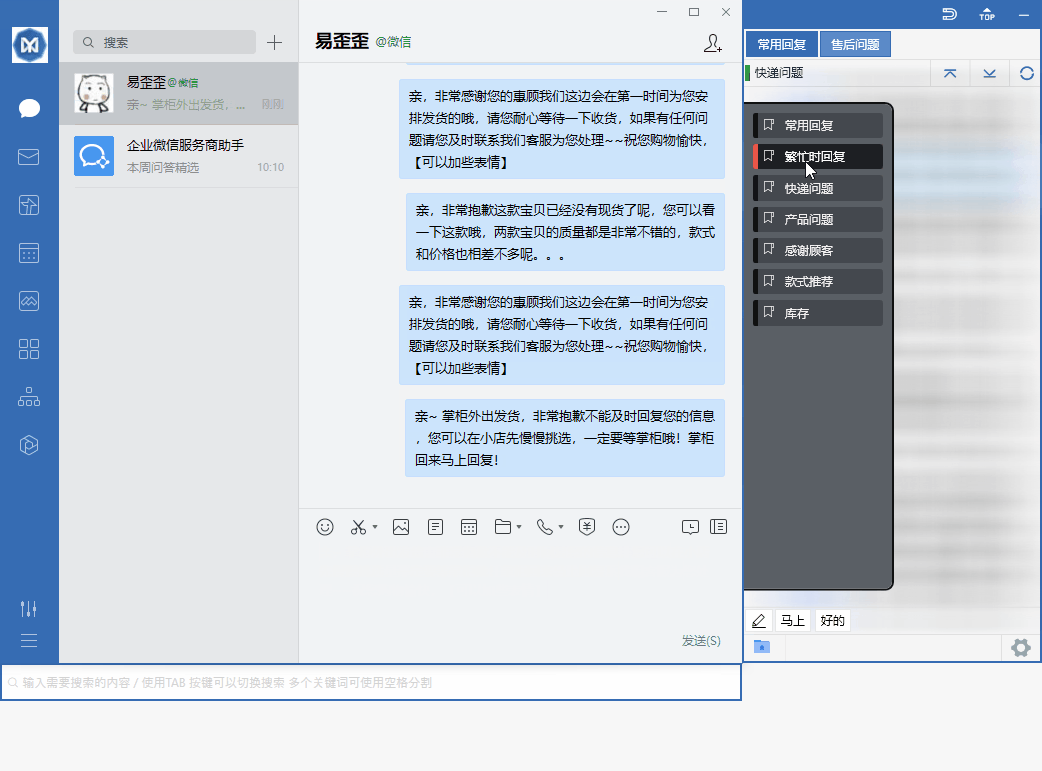
Canned responses are divided into public scripts (shared by the team, synced in real time, and editable by several people at once) and private scripts (visible only to yourself). The main account sets up the public scripts, and each member signs in to share them. Note that cloud sync relies on servers in mainland China, so the reachability of the Cambodian network needs to be confirmed by your own testing.
How do I sign in to the Mac version of Yiwaiwai? Is it the same account as the one used on Windows?
It is the same account. Yiwaiwai supports Windows, macOS, Android, iOS, and a browser extension, and canned responses roam across devices with your account.
On the Mac version, sign in with the account and password you used to register, and your canned-response data will sync in real time with the Windows side through the cloud. A change made on one device updates automatically on the other signed-in devices. If the Mac install reports that it cannot be opened (blocked by Gatekeeper), go to System Preferences, then Security and Privacy, then General, and choose Open Anyway.
How do you set up multi-device synchronized sign-in for Yiwaiwai, since the company has several computers that need the same canned responses?
The Yiwaiwai approach is that all the computers sign in to the online-version client with the same account, and the canned responses will then sync to the cloud in real time and stay consistent; a change on one device automatically updates the other signed-in devices.
For team scenarios, it is recommended to put shared content in the public / company canned responses (shared by everyone, editable by several people at the same time with real-time sync), while private canned responses are visible only to the owner. Members can also create several customer service sub-accounts and assign roles and permissions. Key point: the number of devices online at the same time is limited by the license type, so for several computers please choose a license that supports multiple devices or the enterprise version, and view the online devices under account management / device management in the back end.
Compiled from public sources such as WeCom, WeChat, Taobao Qianniu and others; every link is clickable for verification.
Frequently Asked Questions
Can one Yiwaiwai account be used by several people together, and is it OK for a team to share one account?
Yes. The official side of Yiwaiwai clearly supports one account being used by several people at the same time, with canned-response data synced to the cloud in real time. Canned responses are divided into public and private (some versions further break this down into company / group / private): public canned responses are shared by the team, visible and usable by all customer service agents, and support simultaneous editing by several people with real-time sync; private canned responses are visible only to the owner. Members can also customize several customer service sub-accounts and assign roles (pre-sales / after-sales / quality inspection, and so on). Note: the number of devices online at the same time is limited by the license type / version, with the personal version often allowing one device, while the multi-device / enterprise version allows more, subject to your plan.
What is the difference between the Yiwaiwai team version and a personal account, and how do I register a team account?
The main difference in Yiwaiwai lies in multi-person collaboration and concurrency. A personal account usually allows only 1 device online at a time and is meant mainly for individual use. The team or enterprise version supports multiple seats or multiple concurrent sessions online at the same time, and a member can create several customer-service sub-accounts, assign roles such as pre-sales, after-sales, and quality inspection along with separate permissions, share public and company canned responses across the whole team with real-time sync, and keep private canned responses visible only to the owner. To register, first sign up the main account with a phone number or email and activate the membership, then create the sub-accounts in the console and assign roles. The official pricing page does not publish a specific quote for the team version, so we recommend contacting official support.
How many accounts can the free version of Yiwaiwai manage, and how many can membership open?
Yiwaiwai membership (paid) lets you customize multiple customer-service sub-accounts and assign roles (such as pre-sales, after-sales, quality inspection, and data analysis), making it convenient for a primary account to build a team, share canned responses, and have members sign in separately for multi-person collaboration. How many sub-accounts you can open and how many platform accounts you can bind are divided by plan (such as 5, 10, or more). The free and standalone version leans toward personal use, stores data locally, and does not support multi-person cloud sharing, so it has no team sub-account system. The official pricing page does not list specific quotes for the team version or the exact seat counts, so we recommend going by the authorization type and seat count in the official site console (please confirm the exact numbers by testing).
How much is the price difference between Yiwaiwai Pro and the enterprise version?
Yiwaiwai personal VIP has a public quote: 48 yuan for 1 year, 76 yuan for 2 years, and 98 yuan for 3 years. But the official pricing page does not list a specific price for the enterprise or team version. The team features (creating several customer-service sub-accounts, binding 5, 10, or more platform accounts by plan, and assigning role permissions) are tiered by plan, and the official side has not published a uniform team-version quote. So how much the two differ cannot be given as an exact number at present, and you need to consult official support directly for a team quote.
How many computers can a single Yiwaiwai membership account be signed in on at the same time?
How many computers a single Yiwaiwai membership account can be signed in on at the same time depends on the license type you buy: the personal version usually supports only 1 computer online at a time; a standard or multi-device license can have several signed in at once; and the enterprise version is billed by seats or concurrency and can support dozens to hundreds of concurrent sessions. The official side says the same account supports signing in on multiple devices with automatic cloud sync, where a change on one device updates the others, but the number online at the same time is not unlimited. For the exact number you can sign in on, check your license and seat count under Account management or Device management in the client or the website console.
On Android, Yiwaiwai needs accessibility permission. If I turn it on, could my account be stolen?
Customer service quick-reply software like Yiwaiwai relies on accessibility permission to read and fill canned responses into the chat window, which is a common technical prerequisite for this kind of window-docking canned response sending feature. The genuine version turning on this permission is to make the feature work and does not equal account theft. The real account-theft risk comes from unofficial packages: a cracked version may carry a hidden risk of account data leakage, and an impersonation package is even more dangerous. So: download the Android version only through the official channel and grant only the necessary permissions. If it concerns you, the main usage is actually on the computer, and the phone client is only a companion. The specific permission purposes are not covered in the materials, so it needs hands-on testing to confirm.
Yiwaiwai asks for contacts and SMS permissions. Is that normal and safe?
Keep your guard up a bit. Yiwaiwai registration uses an SMS verification code (you enter a mobile number and receive a 6-digit code), and some apps request SMS permission to read the code automatically, which is explainable; but as an e-commerce customer service canned response tool, its core features (storing canned responses and sending canned responses) should not need contacts. If some version insists on demanding contacts or SMS permission before it will work, it is best to refuse unnecessary authorization and verify whether what you downloaded is the official genuine version, since a cracked or impersonation package is more likely to over-request permissions. The safest approach: download from the official site and authorize as needed. The specific permission purposes are not covered in the materials, so it needs hands-on testing to confirm.
Does Yiwaiwai require you to register an account before you can use it, or can you try it first without registering?
Registration is not strictly required. After you download and install Yiwaiwai, you can directly use basic features such as quick replies and canned-response editing, and when you are not registered, the data is saved only on your local machine. You need to register and sign in to an account only if you want features such as cloud sync, team-shared canned responses, and roaming across multiple devices. So if you just want to try it first, simply install the standalone / offline version, which is fully local, permanently free, and does not require an Internet connection; you can register for the online version later once you have confirmed that you like it and want to share canned responses among several people.
Can Yiwaiwai be registered and signed in to normally in Hong Kong, or will it be restricted?
Yiwaiwai is aimed at e-commerce customer service on the mainland, and account registration and cloud sync rely on mainland servers. Whether overseas regions such as Hong Kong can connect stably is not currently clearly stated by the official side, so you need to test and confirm this yourself. The safer approach is: first try to register with a mobile number or an email address, and if any step among the verification code, sign-in, or sync gets stuck, you can switch to the standalone / offline version, which runs fully locally, needs no Internet connection, and needs no registration, so it can bypass cross-border network problems. The official side currently offers no guarantee regarding overseas reachability, so a self-test before use is recommended.
Can people here in Singapore download and register a Yiwaiwai account?
As for downloading Yiwaiwai, the official installer is hosted on an Alibaba Cloud Hong Kong OSS node, which is geographically fairly close to Southeast Asia, so it can generally be downloaded, although cross-border network speed will fluctuate. As for registration, the account system relies on mainland servers, and whether Singapore can smoothly receive the verification code, sign in, and sync is not clearly stated by the official side, so it needs testing. It is recommended to first try email registration; if you get stuck at the verification code or at sync, switch to the standalone / offline version, which runs locally, needs no registration, and still lets you use basic features such as quick replies.
How do you turn on cloud sync of canned responses in Yiwaiwai, and when you sign in on a different device, will the canned responses sync automatically?
Yiwaiwai can sync automatically. Cloud sync is an online-version / VIP feature: after you sign in to the client with your account and password, the canned-response data syncs to the cloud in real time, so a change made on one device automatically updates other signed-in devices, and signing in on a different device also shows the same canned responses. To enable it, register and sign in to an account and use a version that supports cloud sync (the free version can store about 200 entries, while VIP can store more than 10000 entries and enjoy automatic cloud backup). If you are using the standalone / offline version, the data is stored only locally and does not roam through the cloud.
What causes Yiwaiwai to keep showing a loading spinner and fail to sign in, and how do you fix it?
Yiwaiwai continuously showing a spinner is most likely because the network cannot connect to the cloud service, which is especially common when the overseas cross-border link is unstable. You can troubleshoot as follows: first, check whether the network is working and try again on a different network or at a different time; second, confirm that the account and password are correct and that the version is the latest; third, wait a moment and retry, avoiding network peak hours. If you repeatedly cannot connect and you only need basic features, you can switch to the standalone / offline version, which runs locally and does not depend on the cloud, so it will not get stuck at sign-in. The official side offers only email support ([email protected], with a promised reply within 24 hours), and you can attach a screenshot with your feedback. (There is no dedicated official FAQ for specific sign-in failures; the above is general troubleshooting and needs to be tested and confirmed.)
Can you sign in to Yiwaiwai directly by scanning a WeChat QR code, without separately registering an account?
According to the official description, Yiwaiwai registration is primarily based on a mobile number, and it also supports registration with an email address plus a password, after which you sign in to the client with your account and password. Whether one-tap sign-in by scanning a WeChat QR code is offered is not clearly stated in the available material, so it needs to be checked and confirmed on the actual sign-in page of the app or the official website. If you do not want to register a separate account, the simplest approach is to use the standalone / offline version, which needs no account registration and runs fully locally, letting you directly use basic features such as quick replies.
Can a Yiwaiwai account be signed in to on a computer and a phone at the same time using the same account?
Yes. The official side of Yiwaiwai clearly states that the same account supports sign-in on multiple devices at the same time with automatic cloud sync, and canned responses roam across platforms along with the account, supporting Windows, macOS, Android, iOS, and a browser extension. In other words, when a computer and a phone sign in with the same account, the canned responses stay consistent. Note: the number of devices online at the same time is tied to the license type / version, with the personal version usually allowing only one device online at a time, while a multi-device license or the enterprise version supports several, subject to the device management / seat count shown in the back end.
I am in Thailand; can Yiwaiwai be registered, and do I need to bypass the firewall to sign in?
The Yiwaiwai installer is hosted on an Alibaba Cloud Hong Kong node, so Thailand can generally download it, although cross-border network speed will fluctuate. Registration and sign-in rely on mainland servers, and whether Thailand can smoothly receive the verification code, sign in, and sync is not specifically addressed by the official side for overseas use, nor is there any official guidance on whether extra network measures are needed, so you need to test it yourself. It is recommended to first try email registration to test the connection; if it lags, switch to the standalone / offline version, which runs locally and needs no registration or Internet connection, so it is not affected by cross-border networks.
After registering for Yiwaiwai, does the free version have feature limits, and do you need to pay for membership?
The Yiwaiwai free version has limits but can be used normally. The free version stores about 200 phrases, and multi-keyword search, global custom hotkeys, batch operations, and more are exclusive to Pro / VIP. After subscribing to membership (from about 48 RMB per year), you unlock storage for more than 10000 entries, cloud sync of canned responses, Excel/EBF import and export, 7-day automatic cloud backup, and more. If your daily volume of canned responses is not large and you use it personally, the free version is enough for most cases; if you have many canned responses and need team cloud sync or batch operations, paying for membership is more worthwhile. Cloud backup (7-day automatic plus manual) is the same in both versions.
What is the complete process for registering a Yiwaiwai account, and what do you need to prepare?
For Yiwaiwai you only need to prepare a mobile number or an email address. The process: open the official website or the app, tap Register / Sign in or Use now, then choose the mobile number entry, then enter your 11-digit mobile number, then tap Get verification code, then enter the 6-digit SMS verification code, then confirm to complete registration and sign in automatically; you can also register with an email address plus a password (the email receives a verification code for activation). After that, you sign in to the client with your account and password, and the software automatically attaches to chat windows such as QQ, WeChat, and Qianniu, so you double-click a canned response to send it. If you want to try it first without registering, you can directly use the standalone version.
How do you recover your Yiwaiwai password if you forget it, and can you still sign in if no mobile number is bound?
For Yiwaiwai you usually tap Forgot password on the sign-in page and reset it by receiving a verification code through the mobile number or email address used at registration. If you registered with a mobile number, it is recommended to recover it using that number; if you registered with an email address, recover it using the email address. The material does not give a specific recovery path for the case where no mobile number is bound, so this needs to be tested or you can contact official customer service (support email: [email protected], with a promised reply within 24 hours). A reminder: standalone / offline version data is stored locally and does not depend on a cloud account, so there is no issue of cloud recovery.
After registering for Yiwaiwai, can you sign in and use it directly, or do you have to wait for review approval?
After registering for Yiwaiwai, you can sign in and use it directly, with no need to wait for review. The mobile number registration process is to enter the number, get the verification code, and enter the 6-digit verification code to confirm, which completes registration and signs you in automatically; with email registration, after the email receives a verification code for activation, you can sign in to the client with your account and password. After signing in, the software automatically attaches to chat windows, and you double-click a canned response to send it. The free version gives you basic features right away (about 200 phrases), and if you want advanced features such as cloud sync and batch operations, you can simply upgrade to membership, likewise with no review.
When downloading the Yiwaiwai computer version in Cambodia, can it be installed and signed in to normally overseas?
Installing Yiwaiwai is generally no problem: the official package goes through Alibaba Cloud Hong Kong OSS, so Cambodia can download it (cross-border network speed will fluctuate), and the installation steps are the same as on the mainland. As for signing in, you need to distinguish clearly: the standalone / offline version needs no registration or Internet connection and runs locally, so it can be installed and used as usual overseas; the registration, sign-in, and cloud sync of the online version / Pro rely on mainland servers, and overseas reachability is not clearly stated by the official side, so it needs testing. Recommendation: if you only use basic features such as quick replies, installing the standalone version is the most reliable; if you want cloud sync, try the online version and test the network availability yourself. For downloading, look for this site, yiwaiwaiservice.com.
After Yiwaiwai is installed, how do you register an account and start using it for the first time?
Yiwaiwai has two routes. First, if you want to use it right away: after installing, simply open it and you can use basic features such as quick replies and canned-response editing, and without registration the data is stored on your local machine, which suits the standalone / offline version. Second, if you want cloud sync and sharing of canned responses among several people, you need to register: open the software or the official website and tap Register / Sign in (or Use now), then choose the mobile number entry, then enter your 11-digit mobile number, then tap Get verification code, then enter the 6-digit SMS verification code you received, then confirm to complete registration and sign in automatically. Some pages also support registration with an email address plus a password (the email receives a verification code for activation). After signing in, the software will automatically attach to chat windows such as QQ, WeChat, and Qianniu, so you can double-click a canned response to send it.
After downloading the Yiwaiwai computer version, the sign-in screen gets stuck overseas; what do you do?
The sign-in screen getting stuck is usually a cross-border network reachability issue with the cloud sign-in service, since the sign-in and cloud sync of Yiwaiwai rely on mainland servers, and they will get stuck on the sign-in screen when the overseas or cross-border network is unstable. You can first troubleshoot: try again in a different network environment, retry after a moment, and confirm that the software is the latest version. If you only need basic features such as quick replies and canned-response editing, you can switch to the standalone / offline version: it runs fully locally, needs no sign-in, and needs no Internet connection, directly bypassing the stuck sign-in problem (note that standalone version data is stored locally and does not roam through the cloud). Overseas network reachability is an unverified detail, so testing is recommended, or contact official customer service (email [email protected], replying within 24 hours).