 Yiwaiwai
 Yiwaiwai vs similar tools: comparison and version-choosing guide
A side-by-side look at Yiwaiwai against similar tools and its plans — features, pricing, team collaboration and overseas use — so you can judge the value and pick the right version.


What exactly is the difference between the free and paid versions of Yiwaiwai?
The main differences between the free and paid versions of Yiwaiwai are capacity and advanced features.
Free version: phrase storage of about 200 entries, and no multi-keyword search, global custom hotkeys, or batch operations; the standalone version also does not support cloud sync or multi-device roaming. Paid membership (Pro/VIP): phrase storage rises to over 10000 entries, and it opens up multi-keyword search, global hotkeys, batch operations, and Excel/EBF import and export, plus support for canned-response cloud sync, multi-device roaming, and team sharing of canned responses.
Cloud backup is the same in both versions (7 automatic plus 7 manual over 7 days). In short, the free version is enough for light personal use, while the paid version leans toward large capacity and team collaboration.
What is the difference between the Yiwaiwai team version and a personal account, and how do I register a team account?
The main difference in Yiwaiwai lies in multi-person collaboration and concurrency.
A personal account usually allows only 1 device online at a time and is meant mainly for individual use. The team or enterprise version supports multiple seats or multiple concurrent sessions online at the same time, and a member can create several customer-service sub-accounts, assign roles such as pre-sales, after-sales, and quality inspection along with separate permissions, share public and company canned responses across the whole team with real-time sync, and keep private canned responses visible only to the owner.
To register, first sign up the main account with a phone number or email and activate the membership, then create the sub-accounts in the console and assign roles. The official pricing page does not publish a specific quote for the team version, so we recommend contacting official support.
Which is more cost-effective for Yiwaiwai, monthly or annual payment?
The official Yiwaiwai VIP pricing is in annual-and-up plans, and there is no separate monthly option: about 48 yuan for 1 year, 76 yuan for 2 years, and 98 yuan for 3 years.
The more years you buy, the cheaper it is per year on average. The 3-year plan works out to about 32.7 yuan per year, which is more cost-effective than buying 1 year alone. So if you are sure you will use it long term, going straight for the 2-year or 3-year plan gives the lowest unit price.
If you only want a short trial, buy the 1-year plan at 48 yuan. Overseas users mostly pay through Alipay, WeChat, or Taobao proxy top-up.
Compared with a one-year Yiwaiwai membership and a one-time permanent purchase, which is more cost-effective?
First, sort out the concepts: Yiwaiwai has two tracks. (1) The standalone version (the offline version) is permanently free in itself, with data stored on your own machine, which amounts to a free one-time purchase of the basic features, but it does not go to the cloud and cannot sync across people or devices.
(2) The networked VIP version is a yearly subscription (48 yuan for 1 year, 98 yuan for 3 years, about 32.7 yuan per year) and unlocks cloud sync, team sharing, batch operations, hotkeys, and more. The company does not offer a paid one-time permanent Pro version. So: if you only need local quick replies, use the permanently free standalone version; if you need cloud sync or multi-person collaboration, subscribe to VIP by the year, and the more years you buy, the lower the per-year price.
Compared with a multi-instance clone tool, which is safer and less likely to get banned, Yiwaiwai or the clone?
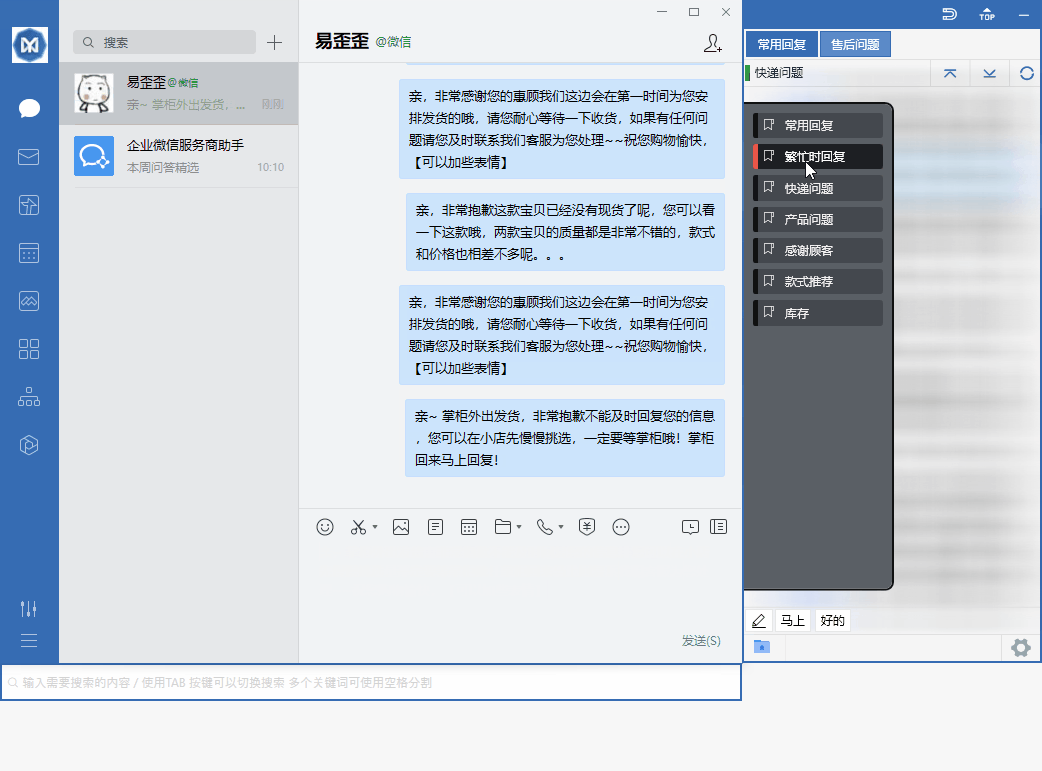
The two are actually not the same kind of tool: Yiwaiwai is a customer service helper that docks onto chat windows to send quick canned responses, and it does not log in for you or change platform mechanisms; a multi-instance clone lets the same app run multiple account instances.
Whether you get banned mainly depends on the risk-control rules of the platform you log in to for multiple accounts and automation, rather than simply on which tool you use. As for software source safety, the key is not to use a cracked or impersonation package and to stick to downloading from the official site. The materials do not make a ban-rate comparison between the two, so which is less likely to get banned needs your own hands-on testing to confirm according to the specific platform rules.
Compared with Kefubao and Kuaijie Zhushou, which is more convenient and more suitable for overseas customer service: Yiwaiwai?
These are all similar quick-reply and canned-response tools for customer service, with comparable mechanisms (scripts split into public and private, and team sharing and sync).
From the available materials, Yiwaiwai has permanently free basic features, a standalone offline edition, and Pro starting at just 48 yuan per year, so the price threshold is low, and it fits the mainland China e-commerce ecosystem such as Qianniu, Pinduoduo, WeChat, and QQ. But as for which is better for overseas customer service, neither the official side nor Chinese-language communities (Zhihu, Xiaohongshu, Dcard, PTT) have much targeted review, so reliable comparison sources are lacking. It is recommended to decide based on the platforms you commonly use and whether you need offline or team sync, after actually trying them out, and to confirm through testing.
Compiled from public sources such as Taobao Qianniu, WeCom, MIIT ICP Filing and others; every link is clickable for verification.
Frequently Asked Questions
Can one Yiwaiwai account be used by several people together, and is it OK for a team to share one account?
Yes. The official side of Yiwaiwai clearly supports one account being used by several people at the same time, with canned-response data synced to the cloud in real time. Canned responses are divided into public and private (some versions further break this down into company / group / private): public canned responses are shared by the team, visible and usable by all customer service agents, and support simultaneous editing by several people with real-time sync; private canned responses are visible only to the owner. Members can also customize several customer service sub-accounts and assign roles (pre-sales / after-sales / quality inspection, and so on). Note: the number of devices online at the same time is limited by the license type / version, with the personal version often allowing one device, while the multi-device / enterprise version allows more, subject to your plan.
After registering for Yiwaiwai, does the free version have feature limits, and do you need to pay for membership?
The Yiwaiwai free version has limits but can be used normally. The free version stores about 200 phrases, and multi-keyword search, global custom hotkeys, batch operations, and more are exclusive to Pro / VIP. After subscribing to membership (from about 48 RMB per year), you unlock storage for more than 10000 entries, cloud sync of canned responses, Excel/EBF import and export, 7-day automatic cloud backup, and more. If your daily volume of canned responses is not large and you use it personally, the free version is enough for most cases; if you have many canned responses and need team cloud sync or batch operations, paying for membership is more worthwhile. Cloud backup (7-day automatic plus manual) is the same in both versions.
What is the official download address for the Yiwaiwai computer version, and how do you confirm it is not a fake website?
Yiwaiwai can be downloaded from this site, yiwaiwaiservice.com, where both the Windows and Mac versions are obtained directly on this site download page. To tell real from fake, look at a few points: the page is signed by Fuzhou Kuishang Technology Co., Ltd. / Suncrest Technology, with ICP filing number Min ICP Bei 2025102014, and downloading directly from this site is all you need. Be wary of the many high-imitation domains, such as yi-waiwai.com, eyy250.com.cn, cn-eyy250.com, and others; among them, the download button on yi-waiwai.com jumps to an unrelated disposable .shop domain that directly serves an exe, which is malicious distribution, so do not download it. Just look for this site, yiwaiwaiservice.com. Before downloading, you can also go to beian.miit.gov.cn to check the filing yourself.
Are the Pro version and the regular version of Yiwaiwai the same installer to download?
According to the official product lines, Yiwaiwai has two lines, the standalone / offline version and the online version / Pro, and the standalone version introduction page and the Pro download are different entries with different installers. The standalone version is fully local, permanently free, and needs no registration or Internet connection; the Pro / online version requires registration and sign-in before you can use cloud sync, team sharing, and roaming across multiple devices. The basic features are free in both, while the advanced features of Pro (cloud sync, batch operations, hotkeys, more than 10000 entries) require subscribing to VIP membership. When downloading, simply choose the corresponding version according to your needs, and getting the package from this site, yiwaiwaiservice.com, is the most reliable approach in every case.
Can the Yiwaiwai free version be used right after downloading, or must you buy Pro before you can download?
Downloading and installing are completely free, with no need to buy Pro. The Yiwaiwai official website home page clearly states Basic features permanently free, and after installing you can directly use basic features such as quick replies and canned-response editing, and even without registration the data is saved on your local machine. Among these, the standalone / offline version is permanently free, needs no Internet connection, and needs no account registration. Only to unlock advanced features (expanding canned responses from 200 to more than 10000 entries, cloud sync, multi-keyword search, global hotkeys, batch operations, and so on) do you need a paid membership (Pro / VIP). So download with confidence, use it for free first, and consider upgrading later if you need advanced features.
How much does Yiwaiwai Pro cost after downloading, and is it a one-time purchase or a monthly subscription?
Yiwaiwai Pro membership (VIP) is billed by annual subscription, not monthly and not a permanent one-time purchase. The personal VIP prices given on the official pricing page are: 48 RMB for 1 year, 76 RMB for 2 years, and 98 RMB for 3 years (RMB), with a lower unit price the more years you buy, and the 3-year plan working out to about 32.7 RMB per year. What the payment unlocks is storage for more than 10000 canned responses, cloud sync, multi-keyword search, global hotkeys, batch operations, Excel import and export, automatic cloud backup, and more. Note that this is the RMB pricing on the mainland official website, and overseas users usually pay through Alipay, WeChat Pay, or a Taobao top-up agent, since the official side does not separately list Hong Kong, Taiwan, or overseas currency prices.
On which website is it faster to download the Yiwaiwai installer?
We recommend downloading Yiwaiwai from this site, yiwaiwaiservice.com. Its installer is hosted on an Alibaba Cloud Hong Kong OSS node, which is geographically closer for users in Southeast Asia and Hong Kong and Taiwan and is usually faster than a mainland node. However, the cross-border public network is affected by carrier interconnection quality, so speed fluctuates across different regions and times of day, which is normal. The installer itself is very small (about 40 to 80MB), and most slow downloads are actually network jitter. If your network is unstable, you can use a download manager that supports multithreading and resume-from-breakpoint (such as IDM), drop the download link into it, and it can even resume after a dropped connection (this is a community method, not endorsed by the vendor). Third-party download sites can get you the package too, but they carry risks of bundling, repackaging, and antivirus alerts, so getting the package from this site is the most reliable.
What feature limits does the free version of Yiwaiwai have?
The main limits of the free version of Yiwaiwai are: phrase (canned response) storage of about 200 entries; no multi-keyword search, global custom hotkeys, or batch operations; the standalone and free version stores data locally and does not support cloud sync or multi-device roaming, nor can it share canned responses with others through the cloud. As for cloud backup, the free version is the same as the paid version (7 automatic plus 7 manual over 7 days). The limited features (large capacity, hotkeys, batch operations, cloud sync, and so on) all belong exclusively to the paid membership (Pro/VIP). If you only do basic quick replies as an individual, the free version is usually enough; consider upgrading when you need these advanced capabilities, with membership starting at about 48 RMB per year.
How much exactly does the Yiwaiwai Pro version charge?
The advanced features of Yiwaiwai Pro/VIP are billed by annual subscription, and the official pricing page lists 48 RMB for one year, 76 RMB for two years, and 98 RMB for three years. After subscribing you unlock canned-response cloud sync, batch operations, global hotkeys, phrase storage raised to over 10000 entries, Excel/EBF import and export, and 7-day automatic cloud backup. It is worth noting that the basic features of Yiwaiwai and the standalone version itself are free forever, and paying is only to unlock these advanced capabilities. Overseas users mostly pay via Alipay, WeChat, or a top-up agent on Taobao, and the vendor does not list separate Hong Kong, Taiwan, or overseas currency prices.
Does Yiwaiwai have a lifetime membership, and how much is a one-time purchase?
The official Yiwaiwai membership (VIP) is billed annually, and the pricing page currently has only the three annual tiers of 48 RMB for one year, 76 RMB for two years, and 98 RMB for three years, with no lifetime one-time purchase option listed. An important distinction: the Yiwaiwai standalone (offline) version itself is free forever, but that is the free version and is not the same as a lifetime membership; to enjoy advanced features such as cloud sync long term you still need to renew the membership annually. If you do not want to renew repeatedly, you can consider the three-year plan (about 32.7 RMB per year) or simply use the standalone version, which is free forever, over the long term.
Can the free version of Yiwaiwai use quick replies and the canned-response library?
Yes. After installation, Yiwaiwai lets you use quick replies, canned-response editing, and other basic features right away, and you can use them without registering, with data saved locally at that point. The software automatically snaps onto chat windows for QQ, WeChat, Qianniu, Wangwang, JD Dongdong, Pinduoduo, DingTalk, and more, and you can send a canned response with a double click; these are all core capabilities built into the free version. The free version limits are mainly capacity and advanced features: phrase storage of about 200 entries, and no multi-keyword search, global hotkeys, batch operations, or cloud sync. For everyday personal customer-service work, the free version quick replies and canned-response library are usually enough, and you upgrade to membership when you need large capacity or team sharing.
How many accounts can the free version of Yiwaiwai manage, and how many can membership open?
Yiwaiwai membership (paid) lets you customize multiple customer-service sub-accounts and assign roles (such as pre-sales, after-sales, quality inspection, and data analysis), making it convenient for a primary account to build a team, share canned responses, and have members sign in separately for multi-person collaboration. How many sub-accounts you can open and how many platform accounts you can bind are divided by plan (such as 5, 10, or more). The free and standalone version leans toward personal use, stores data locally, and does not support multi-person cloud sharing, so it has no team sub-account system. The official pricing page does not list specific quotes for the team version or the exact seat counts, so we recommend going by the authorization type and seat count in the official site console (please confirm the exact numbers by testing).
How do I renew Yiwaiwai membership, and will it auto-charge?
Yiwaiwai membership (VIP) is billed by annual subscription, and the official pricing page offers three tiers of 48 RMB for one year, 76 RMB for two years, and 98 RMB for three years. Renewal is generally a matter of repurchasing the corresponding term in the client or on the official site after expiry. The official materials do not clearly state whether auto-renewal or auto-charge is enabled by default (please confirm by testing), and overseas users mostly pay via Alipay, WeChat, or a top-up agent on Taobao, where such top-ups are usually one-time purchases not bound to auto-charge. If you worry about auto-renewal, we recommend watching for an auto-renew checkbox on the payment page, or asking official support directly before paying (email [email protected], reply within 24 hours) to confirm the renewal rules.
How do I turn off auto-renewal for Yiwaiwai?
The official materials do not specifically state whether Yiwaiwai enables auto-renewal by default, nor do they give a place to turn it off (please confirm by testing). The general approach is: first, if you bought it in the client or on the official site, sign in and go to the account management or membership related pages to see whether there is an auto-renew or subscription management switch, and turn it off if there is; second, if you paid via Alipay or WeChat, you can check and cancel the corresponding merchant under Alipay password-free payment or auto-charge, or under WeChat charge services; third, if you bought it through a top-up agent on Taobao, it is usually a one-time purchase that will not auto-charge in the first place. If you cannot find the place to turn it off, we recommend contacting official support directly (email [email protected], reply within 24 hours) to confirm.
Can the free version of Yiwaiwai use quick replies and docking, and what does membership unlock?
Yes. The basic features of Yiwaiwai are permanently free - after download and installation you can use quick replies, window docking, and canned-response editing without requiring registration, and double-click to send, which meets everyday service needs. Membership (VIP) mainly unlocks the following: phrase storage raised from about 200 entries to 10,000 or more, multi-keyword search, global custom hotkeys, bulk operations, Excel/EBF import and export, cloud sync and multi-device roaming, team-shared canned responses, 7-day automatic cloud backup, and so on. In short: for personal use with low volume, the free version is enough; for a massive number of canned responses, bulk management, and multi-person team sync, upgrade to membership.
Will Yiwaiwai be throttled when used overseas, and how many messages can the free version send per day?
The Yiwaiwai installer is very small (about 40 to 80 MB), and there is no evidence in the materials that the server actively throttles downloads; the so-called slowness is mostly cross-border network jitter. Sending a canned response is a local double-click action, and there is no statement in the materials about a how-many-messages-per-day limit. The real limit of the free version is canned-response storage of about 200 entries, and after upgrading to membership you can store more than 10,000. In other words, the limit is on how many you can store, not on how many you can send per day.
Can I still download an older Yiwaiwai installer, and where do I find historical versions?
The official Yiwaiwai download page mainly offers the current version (the Windows version goes through Lanzou Cloud as eyy-pc, with one NET4 alternative available). Some third-party download sites do host installers with old version numbers (such as an earlier version of the standalone build), but third-party channels are non-official sources, and some also offer a cracked version, with risks of bundling, repackaging, and malware, so we do not recommend downloading from such sites just to find an old version. The safer approach is to get the current version from the official site. If you want to roll back to an old version because the new one lags, the more on-point fix is actually to update to the latest version (which includes performance optimizations) and disable extra plugins. Whether the official side provides historical versions is best confirmed with support (needs to be tested in practice).
If I buy Yiwaiwai Pro and am not satisfied, can I get a refund, and how long is the trial period?
The basic features and the standalone version of Yiwaiwai are permanently free, which means you can effectively trial the basic features for free over the long term, and upgrade to Pro when you find you need advanced features such as phrase cloud sync, bulk operations, and global hotkeys. As for the specific refund policy and trial days after paying for Pro, the official public material does not state them clearly. We recommend making full use of the free version before paying to confirm whether it suits you, and for the refund rules of a formal purchase please consult official support directly (the official email is [email protected], with a promise to reply within 24 hours). The details of refunds and the trial period need to be confirmed with the official side.
Which is faster for the Yiwaiwai installer, downloading with a browser or with an official downloader?
The official Yiwaiwai side does not have a dedicated downloader. Clicking download on the official site redirects to Lanzou Cloud (Windows version) or Alibaba Cloud Hong Kong OSS to get the package, which essentially still uses the browser to download. The installer is very small (about 40 to 80MB), and on a normal network a direct browser download is fast enough. If your network jitters and you often cut off halfway, you can drop the official direct link into a downloader that supports multithreading and resuming (such as IDM) to speed up and resume, which is a community approach. The most reliable and carefree option is still to switch to the standalone or offline version and use it offline for the long term after one download.
Compared with Liaotianbao and Kefubao, which is more suitable for overseas WhatsApp customer service: Yiwaiwai?
These are all window-docking quick-reply tools with similar mechanisms: quickly sending prestored scripts to the chat box, with support for public and private script levels and team sharing. What Yiwaiwai officially adapts to is mainly the mainland China e-commerce ecosystem such as Qianniu, Pinduoduo, WeChat, and QQ, with no dedicated documentation for overseas WhatsApp. Which one is more suitable for overseas WhatsApp depends mainly on the docking stability for the WhatsApp Web or desktop window, and none of these have a clear commitment from their official side for overseas WhatsApp. It is recommended to download the free edition of each, test the docking and sending in your own WhatsApp environment, and then decide, confirming through testing.
Can Yiwaiwai Pro be paid for with WeChat or Alipay, and what if you do not have them overseas?
Yiwaiwai Pro is priced in yuan on the mainland official site (from 48 yuan per year), usually paid through Alipay, WeChat, or Taobao, and the official side does not list a separate currency price for Hong Kong, Taiwan, or overseas. If overseas users do not have a mainland payment method, a common practice is to ask mainland relatives, friends, or colleagues to pay on their behalf, or to find a proxy-payment or top-up service on Taobao. Before paying, please recognize this site, yiwaiwaiservice.com, and avoid paying on an imitation site or a page of unknown origin. The official side does not provide an overseas-specific payment channel (needs to be tested in practice).
I am in Taiwan. Does Yiwaiwai payment support LINE Pay or JKOPay?
The official Yiwaiwai pricing page only lists mainland RMB prices (starting at 48 RMB per year) and does not disclose localized pricing or payment methods for Taiwan, so there is no official information indicating support for Taiwan local tools such as LINE Pay or JKOPay. Currently overseas users and those in Hong Kong and Taiwan mostly pay via Alipay, WeChat, or a top-up agent on Taobao. If you do not have a mainland payment account, you can ask a relative or friend with a mainland account to pay on your behalf, or use the basic version or standalone version, which are free forever, over the long term. For the specific available payment methods, we recommend contacting official support directly before paying to confirm (please confirm by testing).