 Yiwaiwai
 Yiwaiwai Antivirus False Positives and How to Allowlist
Do not panic if your antivirus wrongly deletes files or blocks it from running: verify the source first, then restore files step by step and add Yiwaiwai to your allowlist and excluded folders.

Yiwaiwai requires turning off antivirus software to install. Does that mean it is malicious?
The requirement that Yiwaiwai needs antivirus turned off before it can be installed is precisely a signal to be wary of, especially when it comes from a third-party download site or a cracked version page, because such pages generally do not disclose bundling or source, and telling you to turn off antivirus is often a way to bypass blocking and slip in bundles.
The official package from this site (yiwaiwaiservice.com) generally does not need you to turn off antivirus to install, and being blocked is mostly a reputation false positive that you can allow after confirming the source. Conclusion: for any installer that forces you to turn off antivirus, suspect the source first, and it is best to re-download from this site.
Do I need to add Yiwaiwai to the antivirus allowlist before installing? Is that safe?
Adding Yiwaiwai to the antivirus allowlist before installing is only safe when you have confirmed the source is reliable.
For the official package downloaded from this site (yiwaiwaiservice.com), since domestic software without a signing reputation is often a false positive, adding it to the allowlist is reasonable in this case; but if it is a cracked version from a third-party site, adding it to the allowlist amounts to actively letting potential bundling through, which is very risky. Recommendation: first verify the source is this site, then decide whether to add it to the allowlist, and add only this one program rather than turning off protection entirely. If the source is unknown, do not add it; delete it and re-download from this site.
If I use Yiwaiwai to log in to a game through an emulator, will it be judged as cheating and get banned?
The positioning needs to be clarified first: Yiwaiwai is quick-reply and canned response software for e-commerce customer service, and what it docks onto is chat windows such as Qianniu, Pinduoduo, Douyin Store, WeChat, and QQ.
It is not a game plugin tool, and there is no usage for logging in to a game through an emulator in the official materials. Using it in a game emulator scenario goes beyond its intended use, and whether it triggers a game anti-cheat judgment depends on that game own detection rules and has no direct relationship to Yiwaiwai. To avoid ban risk, using customer service software in a game environment is not recommended, and the specifics need your own hands-on testing to confirm.
If I use Yiwaiwai to run multiple DNF instances, will it be detected and banned?
To be clear first: Yiwaiwai is e-commerce customer service quick-reply software, compatible with chat windows like Qianniu, Pinduoduo, Douyin Store, WeChat, and QQ, and is not a tool designed for running multiple game instances, and there is no usage for DNF or multiple game instances in the official materials.
Using it to run multiple DNF instances departs from the software core purpose, and whether it is detected by game anti-cheat and whether it gets banned is entirely determined by the game own multi-instance and cheat detection policies, with no corresponding relationship to Yiwaiwai. Using customer service software for running multiple game instances is not recommended, and the specific risk needs your own hands-on testing to confirm.
If Yiwaiwai runs more than a dozen accounts at once, will it trigger risk controls and get banned?
Yiwaiwai is designed exactly for multi-account customer service scenarios: the company supports one account for multiple people and cloud sync of public and private canned responses, and the software docks onto windows such as Qianniu, WeChat, and QQ to send canned responses.
It does not log in to accounts for you, nor does it bypass platform mechanisms. Whether risk controls are triggered depends on which platform you are running and each platform risk-control rules for multiple accounts on the same machine and high-frequency replies, rather than on Yiwaiwai itself. The materials do not cover the specific ban thresholds of each platform, so it is best to control the frequency and operate according to platform rules, and the specifics need your own hands-on testing to confirm.
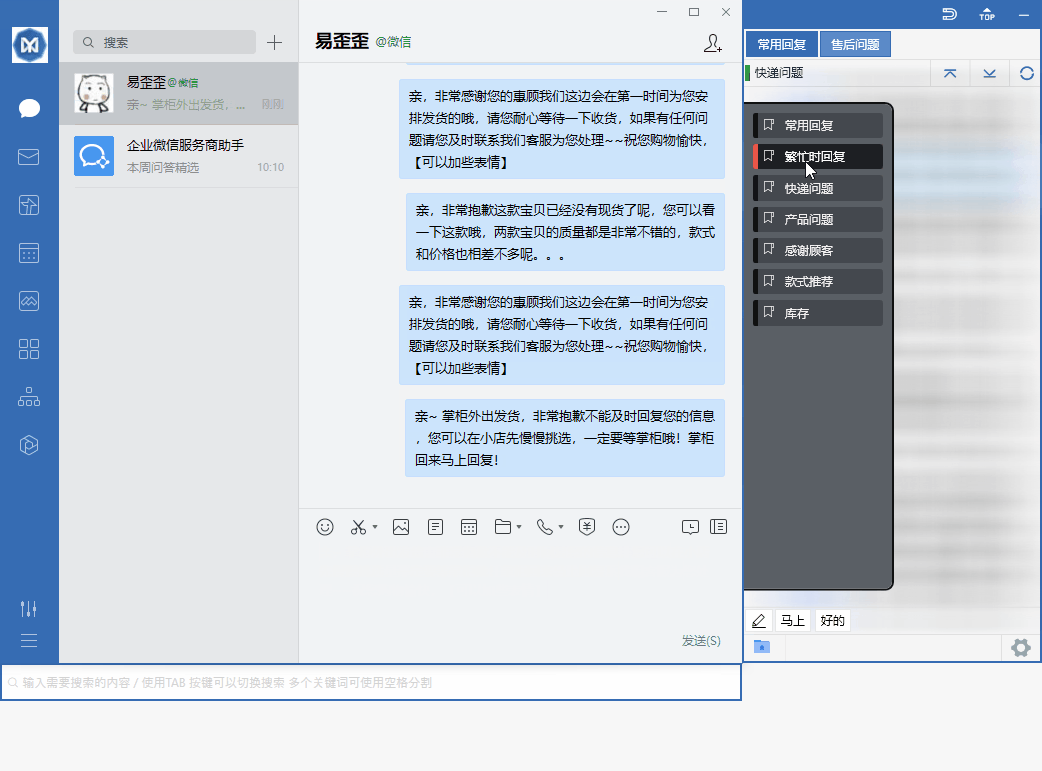
If I use Yiwaiwai to run multiple Taobao Wangwang accounts, will the platform ban me?
Yiwaiwai is a customer service helper that docks onto chat windows such as Wangwang to send quick canned responses.
It does not log in for you, nor does it crack platform mechanisms, and it is not itself a direct target of Taobao penalties. Whether you get banned depends on the risk-control rules of Taobao and Qianniu for multiple accounts on the same device and automated replies, which is decided by the platform and has no fixed corresponding relationship to the software.
It is best to use it normally according to platform rules and avoid mechanical spam-style replies. The materials do not cover the specific ban criteria of Taobao, so the specifics need your own hands-on testing to confirm.
With Yiwaiwai running multiple instances, could logging in from the same machine cause a guilt-by-association ban?
Yiwaiwai itself only docks onto multiple chat windows to send canned responses.
It does not modify platform logins, nor does it create account associations. Whether so-called same-machine guilt-by-association happens depends on the risk-control policy of the platform you log in to for multiple accounts on the same device, rather than on Yiwaiwai. In other words, the guilt-by-association risk comes from the platform-side rules, and the software is not a direct cause.
It is best to operate according to each platform requirements for multiple accounts. The materials do not cover the specific same-machine guilt-by-association criteria of each platform, so the specifics need your own hands-on testing to confirm.
Is it safe to use Yiwaiwai in Indonesia to log in to a domestic account? Could it trigger risk controls?
First, what can be found: Yiwaiwai cloud sync and login depend on mainland China servers, so overseas use needs attention to network reachability, and whether cloud sync can connect smoothly is not made clear by the company.
As for whether logging in to a domestic account across borders triggers risk controls, that is decided by the platform-side remote-login policy and has nothing to do with Yiwaiwai itself. There is no mature guidance from the company or mainstream communities for the specific usability for Southeast Asian Chinese users, so it is unverified. The safe practice: when the network is unstable, switch to the offline standalone version (no internet, data stored locally), and as for account risk controls, test for yourself according to the rules of the platform you log in to.
Compiled from public sources such as Microsoft Defender, Huorong Security, VirusTotal and others; every link is clickable for verification.
Frequently Asked Questions
Is it safe for Filipino Chinese to use Yiwaiwai for e-commerce customer service?
The Yiwaiwai software itself is reassuring when downloaded through the official channel from this site (yiwaiwaiservice.com, Fuzhou Kuishang Technology); but there are two things overseas users should know first: one is that it is compatible with mainland-leaning e-commerce ecosystems such as Qianniu, Pinduoduo, Douyin Store, WeChat, and QQ, so if you use the backends of overseas platforms such as Shopee or Lazada, the compatibility needs your own testing; the other is that cloud sync and login depend on mainland services, and the overseas network reachability is not made clear by the company. There is no dedicated information for Southeast Asian Chinese users in any source (unverified). Recommendation: try it on a small scale first to verify usability, and if the network is unstable, use the offline standalone version.
When logging in to Yiwaiwai with an account registered by mobile number, will my mobile number be leaked?
Yiwaiwai registration is indeed primarily based on a mobile number (you enter an 11-digit mobile number plus a 6-digit SMS verification code), and the mobile number is stored in its account system as the account identifier. This is standard practice for login-type software and does not in itself equal a leak. The real leak risk comes more from unofficial channels: a cracked version may bring a hidden risk of account data leakage, and impersonation sites should be avoided even more. It is best to register and log in only from the official site, and using the offline standalone version means you do not even need to register an account (data is stored only on your own machine). The specific protection measures for the mobile number on its server side are not covered in the materials, so it needs hands-on testing to confirm.
When logging in to Yiwaiwai by scanning a QR code, could my QR code be intercepted and my account stolen?
Logging in with the official client downloaded from this site (yiwaiwaiservice.com) goes through the normal account system of the software, and there is no evidence of QR-code interception or account theft. What really needs guarding against is impersonation and cracked versions: some high-imitation sites point the download link at an unrelated throwaway domain that serves an exe, and only that kind of modified client could possibly tamper with the login step. So the core is one thing: download the client only from this site and do not use a cracked version or a package of unknown source. Yiwaiwai registration is mainly the mobile number plus SMS verification code method, and the specific implementation of QR-code login is not covered in the materials, so it needs hands-on testing to confirm.
Does the Yiwaiwai installer downloaded from a third-party download site come with bundled software?
There is this risk. Third-party download sites (such as Xiazaiyinhang, 3DM, kxdw, 32r, and so on) do indeed also offer the Yiwaiwai installer, and some even directly provide a cracked or pro-cracked version. Such pages generally do not disclose any bundling, source, or risk, and there is the possibility of bundled plugins, modified packages, and virus reports. Even worse are impersonation sites, where the download button jumps to a throwaway domain completely unrelated to the site that serves an exe, which is typical malicious distribution. The safest practice: stick to this site, yiwaiwaiservice.com, take the package directly from this site, and do not download from third-party sites.
How do I verify that the Yiwaiwai installer I downloaded has not been tampered with?
The most practical verification is not computing a hash, but verifying the source: First, confirm the download entry is this site, yiwaiwaiservice.com (copyright attributed to Yiwaiwai, entity Fuzhou Kuishang Technology, filing number Min ICP Bei 2025102014; before downloading you can go to beian.miit.gov.cn to check that filing), and take the package directly from this site. Second, be wary of high-imitation sites: if the download link jumps to an unfamiliar .shop or similar domain unrelated to the site, it has basically been modified. The company has not published an installer checksum, so sticking to this site, yiwaiwaiservice.com, is the most reliable way to judge.
Does Yiwaiwai secretly start at boot and keep running in the background?
As a resident customer service tool that docks onto chat windows, Yiwaiwai stays in the background while in use so that you can double-click a canned response and send it immediately, which is a functional need and does not equal sneaking around. Whether it starts at boot can generally be viewed and turned off in the software settings or the system startup items. What still needs watching out for is the source: only a cracked version or an impersonation package would add abnormal background behavior. It is best to use only the official genuine version; if you are worried about it staying resident in the background, the offline standalone version can be closed when you are done, does not connect to the internet, and stores data only locally, so it is more controllable. The specific startup-item behavior is not covered in the materials, so it needs hands-on testing to confirm.
Why does Yiwaiwai connect to the internet so frequently when running? Is it transmitting data?
The networked or Pro version of Yiwaiwai has to do cloud sync, with public canned responses synced across the team in real time and multi-device roaming, which inherently requires communicating with the server. This is normal behavior of the sync feature and does not equal secretly transmitting your data. If you do not want it connecting frequently, the company offers an offline standalone version: it runs entirely locally, does not connect to the internet, does not go to the cloud, and stores data only on your own machine, which sidesteps any doubts about network transmission at the root. The premise is still downloading the genuine version from the official site; it is the abnormal network activity of a cracked or impersonation package that truly needs watching out for.
Does Yiwaiwai need root or jailbreak to use? Is that safe?
No. Yiwaiwai is normal software for Windows, Mac, Android, iOS, and a browser extension, and the iOS version is even properly listed on the App Store, while the desktop can be installed through the official channel on the official site. There is no requirement for root or jailbreak anywhere in the official materials. If some version requires you to root or jailbreak before it can be used, it is almost certainly a cracked version or an impersonation package, and that kind greatly lowers device security and may also come with bundling. Conclusion: stick to the official genuine version, and do not install anything that requires root or jailbreak.
On Android, Yiwaiwai needs accessibility permission. If I turn it on, could my account be stolen?
Customer service quick-reply software like Yiwaiwai relies on accessibility permission to read and fill canned responses into the chat window, which is a common technical prerequisite for this kind of window-docking canned response sending feature. The genuine version turning on this permission is to make the feature work and does not equal account theft. The real account-theft risk comes from unofficial packages: a cracked version may carry a hidden risk of account data leakage, and an impersonation package is even more dangerous. So: download the Android version only through the official channel and grant only the necessary permissions. If it concerns you, the main usage is actually on the computer, and the phone client is only a companion. The specific permission purposes are not covered in the materials, so it needs hands-on testing to confirm.
Yiwaiwai asks for contacts and SMS permissions. Is that normal and safe?
Keep your guard up a bit. Yiwaiwai registration uses an SMS verification code (you enter a mobile number and receive a 6-digit code), and some apps request SMS permission to read the code automatically, which is explainable; but as an e-commerce customer service canned response tool, its core features (storing canned responses and sending canned responses) should not need contacts. If some version insists on demanding contacts or SMS permission before it will work, it is best to refuse unnecessary authorization and verify whether what you downloaded is the official genuine version, since a cracked or impersonation package is more likely to over-request permissions. The safest approach: download from the official site and authorize as needed. The specific permission purposes are not covered in the materials, so it needs hands-on testing to confirm.
If I use Yiwaiwai to log in to the company WeChat, could it leak company customer data?
The core job of Yiwaiwai is to dock onto the WeChat window and double-click to send default canned responses; it does not itself export your chat records or customer data. But there are two things to note: one is that in the canned response structure, public or company canned responses are shared across the team and visible to all agents, while private canned responses are visible only to the person, so when writing canned responses do not put sensitive customer information into the public library; the other is that you must use the official genuine version, since a cracked version has a risk of account data leakage. The safest approach: download from the official site and keep sensitive data out of public canned responses, or use the offline standalone version that stores data only on your own machine.
Compared with a multi-instance clone tool, which is safer and less likely to get banned, Yiwaiwai or the clone?
The two are actually not the same kind of tool: Yiwaiwai is a customer service helper that docks onto chat windows to send quick canned responses, and it does not log in for you or change platform mechanisms; a multi-instance clone lets the same app run multiple account instances. Whether you get banned mainly depends on the risk-control rules of the platform you log in to for multiple accounts and automation, rather than simply on which tool you use. As for software source safety, the key is not to use a cracked or impersonation package and to stick to downloading from the official site. The materials do not make a ban-rate comparison between the two, so which is less likely to get banned needs your own hands-on testing to confirm according to the specific platform rules.
Compared with the phone built-in app cloning, how is the security of Yiwaiwai?
The two have different functions and are not easy to compare directly: the phone built-in app cloning is a system-level feature backed by the manufacturer, so its security is relatively assured; Yiwaiwai is a third-party customer service canned response tool, and its security mainly depends on where you download it. The genuine version from this site (yiwaiwaiservice.com, Fuzhou Kuishang Technology) is reassuring, while a cracked or impersonation package has the risks of bundling and data leakage. Moreover, the Yiwaiwai phone client is only a companion for storing and viewing canned responses, with the main usage on the computer, and it is not the same thing as running multiple instances of the same app. The materials do not make a security comparison between the two, so the specifics need your own hands-on testing to confirm.
A Yiwaiwai paid membership requires binding a card. Is the payment information safe, and could the card be charged fraudulently?
Yiwaiwai Pro and VIP are a yearly subscription (official prices of 48 yuan for one year, 76 yuan for two years, 98 yuan for three years). The mainland official site uses common payment methods like Alipay and WeChat, and overseas users mostly pay through Alipay, WeChat, or a Taobao top-up agent, so usually there is no need to bind a credit card directly. As long as you pay on a genuine page of this site (yiwaiwaiservice.com), the fraudulent-charge risk is low; what is truly dangerous are impersonation sites and cracked version pages, which may lure you into entering payment information on a knockoff page. Recommendation: pay only on the pricing page of this site, make sure of the domain, and do not top up on third-party or cracked pages.
When topping up or buying a membership in Yiwaiwai, is the payment channel reliable and safe?
Buying on the pricing page of this site (yiwaiwaiservice.com) is reliable: the personal VIP is clearly priced from 48 yuan a year, goes through common channels such as Alipay and WeChat, and overseas users also mostly use Alipay, WeChat, or a Taobao top-up agent. What needs watching out for is not the payment itself, but paying in the wrong place: a large number of impersonation sites and cracked version pages will pose as the official site, and mistaking the domain could mean paying the knockoff party or being lured into entering payment information. So the core is one thing: top up and buy a membership only on the pricing page of this site, yiwaiwaiservice.com, and make sure of the domain before paying.
Why does my computer become laggy after installing Yiwaiwai? Is it infected?
Becoming laggy after installing Yiwaiwai is not necessarily an infection; more commonly it is runtime resource usage. The lag fixes the community suggests can be tried one by one: upgrade to the latest version (which includes performance optimizations, with the new version number in the v1.9.x range), close memory-hogging background programs, reduce the number of plugins running at the same time, turn off animations such as the new hover preview on low-spec machines, and periodically clear the cache and restart to free memory; older machines can add memory or switch to a solid-state drive. If none of these help, or if what you installed is a third-party cracked or impersonation package, only then should you suspect bundling, in which case it is best to delete it and re-download the genuine version from this site, yiwaiwaiservice.com.
My account was stolen while I was using Yiwaiwai. Is it a problem with Yiwaiwai?
You cannot conclude it is Yiwaiwai based on timing overlap alone. If what you use is the genuine version from this site (yiwaiwaiservice.com), it is itself a tool that docks onto windows to send canned responses, and there is no evidence of account theft; but if what you installed is a third-party cracked version, that kind does carry a risk of account data leakage, so the possibility of theft warrants a serious investigation. Recommendation: first confirm the installation source, immediately delete a cracked or impersonation package and change your password and enable two-factor verification; at the same time check whether you have leaked the password elsewhere. Whether it was caused by Yiwaiwai needs your own hands-on testing to confirm, combining the source and the actual login records.
After using Yiwaiwai to log in to WeChat, I received a remote-login alert. Was my account stolen?
A remote-login alert does not necessarily equal theft. If you use Yiwaiwai overseas or across regions, you are already in a remote network environment, so triggering this alert may be normal, especially since its cloud service depends on the mainland, and the network path changes for cross-border use. But the premise is that you use the official genuine version; if you installed a cracked or impersonation package, then treat the remote login as a theft signal and handle it seriously: immediately change the password, enable device verification, and kick off unfamiliar devices. To judge whether it was truly stolen, test for yourself, combining your actual network environment and the login device list.
After using Yiwaiwai, my game account was suddenly banned. Can it be confirmed that Yiwaiwai caused it?
It cannot be confirmed; on the contrary, it is most likely unrelated. Yiwaiwai is e-commerce customer service quick-reply software, compatible with chat windows such as Qianniu, Pinduoduo, Douyin Store, WeChat, and QQ. It is neither a game plugin nor has any game-related usage, and there is no game scenario at all in the official materials. A game account ban is usually determined by that game own anti-cheat detection and your game behavior, and has no corresponding relationship to a customer service canned response tool. To find the cause, you should look at the game ban appeal and detection rules; whether it is related to Yiwaiwai needs your own hands-on testing to confirm, but the materials do not support such an association.
Some people online say Yiwaiwai is scam software. Is that true?
Yiwaiwai is itself a product with a legitimate company entity (this site, yiwaiwaiservice.com, Fuzhou Kuishang Technology Co., Ltd., with a filing number) and is a quick-reply tool for e-commerce customer service, not scam software. Claims of a scam mostly stem from impersonation and hijacking: some high-imitation sites point the download button at a completely unrelated throwaway domain that directly serves an exe, and there are also cracked version pages that conceal bundling, so users who downloaded through these channels got harmed and mistakenly think it is a problem with the software itself. Conclusion: stick to downloading from this site, yiwaiwaiservice.com, and stay away from impersonation sites and cracked versions, and you can avoid these pitfalls.